
Last updated: August 13, 2026
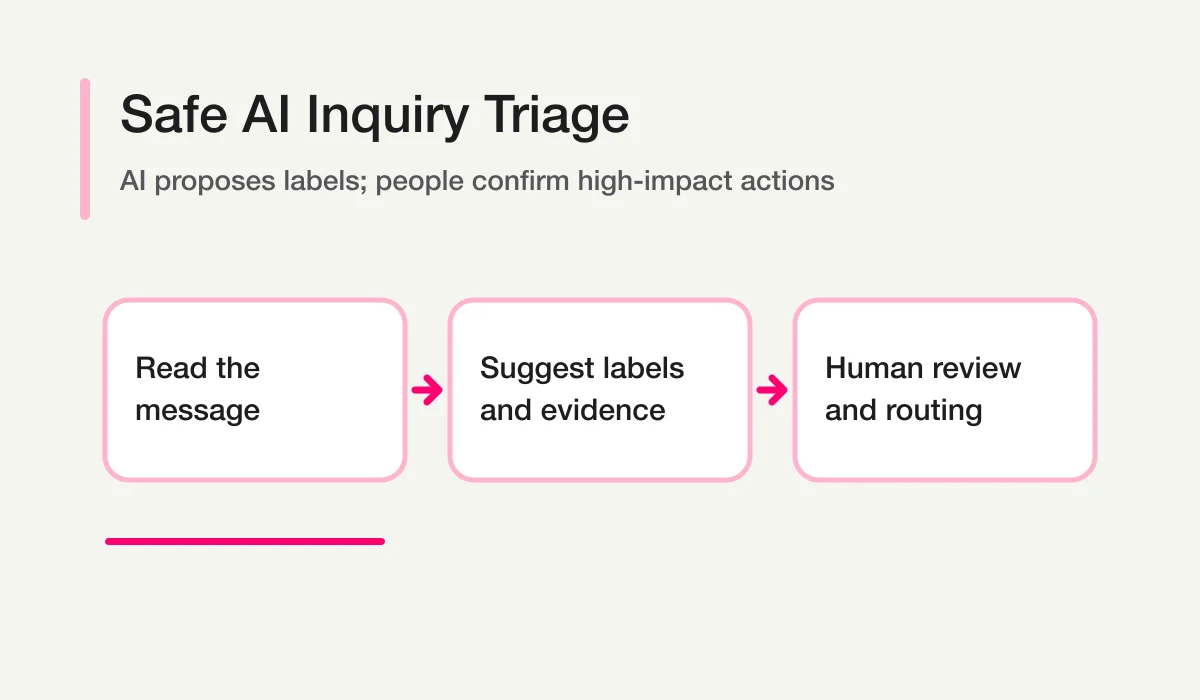
Inquiry classification is the step between receiving a message and deciding who should handle it. AI can reduce the reading burden, especially when the real intent is buried in free text. It should not make every operational decision automatically.
Use AI to propose a category, priority, owner role, and review reason. Use explicit rules and human confirmation for high-impact actions.
This approach is slower than blind automation by a few seconds and much safer when messages are ambiguous, urgent, sensitive, or legitimate inquiries that resemble sales outreach.
Start With Five Labels
Do not begin with dozens of categories. Start with five independent label families.
| Label | Example values | Purpose |
|---|---|---|
| Category | sales, billing, support, recruiting, press, other | What the inquiry concerns |
| Priority | high, normal, low, needs_review | Review order |
| Owner candidate | sales, support, finance, recruiting, admin, unknown | Suggested destination |
| Message type | legitimate, sales_pitch, spam, test, needs_review | Whether it belongs in normal work |
| Action | reply, investigate, assign, exclude_after_review, no_action | Proposed next step |
Keep these fields separate. A sales inquiry can be high priority. A sales pitch can be politely written. A support request can have an unknown owner. One label should not silently determine all the others.
Why a Category Dropdown Is Not Enough
A respondent-selected category is useful deterministic input. It is not always the true operational category.
- People choose “Other” because they are unsure.
- A pricing question may also describe a technical integration issue.
- A support request may contain a renewal risk.
- A partnership message may be a mass sales pitch.
- An urgent tone may not describe an urgent impact.
Preserve the selected category and store the AI suggestion separately. If a person confirms a final category, keep that as another field or an auditable state change.
When the respondent’s selected option maps directly to a team, deterministic routing is preferable. Inquiry Auto-Routing covers that rules-based path. AI classification is for the meaning that remains in free text.
Write a Classification Contract
A good classification prompt behaves like a small specification.
Classify the inquiry using only the supplied message and metadata.

Return:
- response_id
- category: sales | billing | support | recruiting | press | other
- priority: high | normal | low | needs_review
- owner_candidate: sales | finance | support | recruiting | communications | unknown
- message_type: legitimate | sales_pitch | spam | test | needs_review
- evidence: one sentence from the supplied facts, without contact details
- next_action_candidate
- confidence: high | medium | low

Rules:
- Do not infer facts that are absent.
- Use needs_review when two labels are plausible.
- Do not assign, send, delete, or exclude.
- A negative tone alone does not establish urgency.
- A promotional message is not automatically spam.
The controlled vocabulary makes outputs comparable. The evidence field lets a reviewer understand the suggestion without rereading every message. The prohibition on actions keeps classification separate from execution.
Define Priority With Observable Signals
Priority should combine impact and time, not tone alone.
Potential high-priority signals include:
- a service is unavailable for multiple users;
- a deadline or event occurs within the current operating window;
- a security or privacy concern is alleged;
- an existing customer cannot complete a critical task;
- the message describes cancellation, legal escalation, or serious harm;
- a high-value operational request is close to expiry.
These are triage signals, not proof. A security claim needs the security process. A legal statement needs qualified review. The classifier’s job is to raise visibility, not to decide the substance.
Use deterministic urgent-keyword rules as an additional safety net when needed. The Urgent Keyword Alert workflow can complement, not replace, contextual review.
Keep Sales-Pitch Detection Separate
Contact forms often receive messages selling SEO, recruiting, development, finance, or other services. Some resemble legitimate partnership inquiries.
Do not use a single binary spam label. A safer model is:
legitimate
sales_pitch
spam
needs_review
Keep suspicious records available for review and reporting. Excluding a record from normal metrics is different from deleting it. The standalone control is explained in Sales Email Detection.
Suggest Owner Roles, Not People
AI can propose a functional destination from the content. It should not invent a named owner or assume a person’s availability.
Map approved categories to roles:
billing -> finance
technical_support -> support
enterprise_pricing -> sales
job_application -> recruiting
media_request -> communications
unknown -> triage queue
Then let a workflow or reviewer resolve the role to the current person or team. This avoids stale assignments when staffing or schedules change.
The Inquiry Owner Assignment workflow is the natural next step after the classification contract is stable.
Combine Classification With Status
Classification explains the record. Status explains the work.
Category: support
Priority: high
Owner candidate: support
Status: new
After review:
Confirmed category: support
Owner: support-on-call
Status: assigned
Later:
Status: waiting
Waiting on: respondent
Next review: August 15
Do not let the classifier mark a record done. Completion requires evidence that the operational work is complete. Use Form Response Status Management for the canonical state design.
Review the Classifier as a System
Before automating routing, review a representative sample.
- Collect legitimate, sales-pitch, ambiguous, urgent, multilingual, and very short messages.
- Write the expected category and acceptable alternatives.
- Run the classification contract without actions.
- Review false negatives first, especially urgent and legitimate messages.
- Adjust labels or examples, not just wording.
- Keep an escape route to
needs_review. - Recheck after categories, products, or team ownership change.
Accuracy alone can hide risk. A classifier that is 95% accurate but misses the rare critical inquiries is not safe. Track errors by impact and direction.
Measure the Review Queue, Not Just Model Agreement
Three measures are more useful than a single headline accuracy number.
| Measure | Question | Why it matters |
|---|---|---|
| Critical false negative rate | How often did a high-impact inquiry receive a normal or low label? | Protects against hidden urgent work |
| Legitimate-message exclusion rate | How often was a real inquiry labeled sales pitch or spam? | Protects demand and customer trust |
| Review yield | How often did needs_review contain a genuinely ambiguous or important record? | Shows whether uncertainty routing is useful |
Review a time-bounded sample and preserve both the model suggestion and the human-confirmed label. If reviewers frequently disagree with one another, the taxonomy or written policy needs work before the prompt does.
Classification drift also comes from the business, not only the model. A new product, pricing policy, team structure, campaign, or abuse pattern can change what messages mean. Schedule a review after material operating changes and inspect the categories that increasingly fall into other or needs_review.
Do not optimize the system by automatically removing uncertainty. A smaller review queue is good only if critical and legitimate messages remain visible.
Privacy and Human-Control Boundaries
Inquiry text can contain personal, confidential, or sensitive information. Retrieve only what is required. Use IDs and redacted summaries in shared output. Follow your organization’s approved AI-client policy.
Always keep human review for:
- security, legal, health, or financial matters;
- hiring or eligibility decisions;
- refunds, commitments, and contract terms;
- deleting or permanently excluding a record;
- sending a reply;
- uncertain classifications with operational impact.
AI classification is decision support. It is not an accountability transfer.
Common Failure Modes
| Failure | Risk | Better design |
|---|---|---|
| One label determines everything | Misroutes compound | Keep category, priority, type, and action separate |
No needs_review option | Ambiguity is hidden | Preserve a review queue |
| Tone equals urgency | Polite critical issues are missed | Use impact, time, and context |
| Sales pitch equals spam | Legitimate partnerships disappear | Use four-way message type |
| AI directly assigns a person | Staffing context becomes stale | Suggest a role, then resolve it |
| Classifier sends replies | Errors reach respondents | Separate classification from execution |
How FORMLOVA Fits
FORMLOVA keeps inquiry responses, search, status, and workflows connected. Its chat-first MCP interface lets the user retrieve and reason over responses in the AI client session, while operational actions remain explicit tools with their own safeguards.
A safe rollout is:
- Run classification in report-only mode.
- Review high-impact errors.
- Approve a small label set.
- Add owner-role suggestions.
- Route only high-confidence, low-risk categories automatically.
- Keep urgent and uncertain records visible to people.
- Measure missed and corrected classifications over time.
For the broader operating model, read Inquiry Management From a Contact Form. To analyze inquiries alongside bookings, applications, and surveys, use Chat With Form Responses.
For the parent operating map covering intake, assignment, status, and follow-up, use the Contact Form Operations Guide.
To try the workflow, start with FORMLOVA.
Disclosure and Verification
- FORMLOVA response-management and workflow claims were checked against the local SPEC, MCP tools, and official workflow recipes on August 13, 2026.
- This guide intentionally avoids current feature claims about third-party help desks and classifiers.