
Last updated: August 13, 2026
Sending every form submission to Slack is easy to demonstrate and difficult to operate.
At first, the stream feels useful. The team sees that the integration works. Then routine registrations, low-value inquiries, test responses, duplicate notifications, and long free-text answers begin to fill the channel. People stop reading. A genuinely urgent response looks like every other message.
The solution is not a more decorative Slack message. It is a notification policy.
A form response notification should tell a specific group why an item needs attention, what action is expected, who owns it, and where the durable source record lives.
Slack is an attention surface. It is not automatically the response database, owner register, audit log, or reporting system.
This guide focuses on the design decisions before implementation. If you need the connection and setup procedure, use the separate form response Slack notification implementation guide. Keeping these two intents separate matters: configuration answers “how do I connect it?” while this article answers “what should be sent after it is connected?”
The short answer: use four notification classes
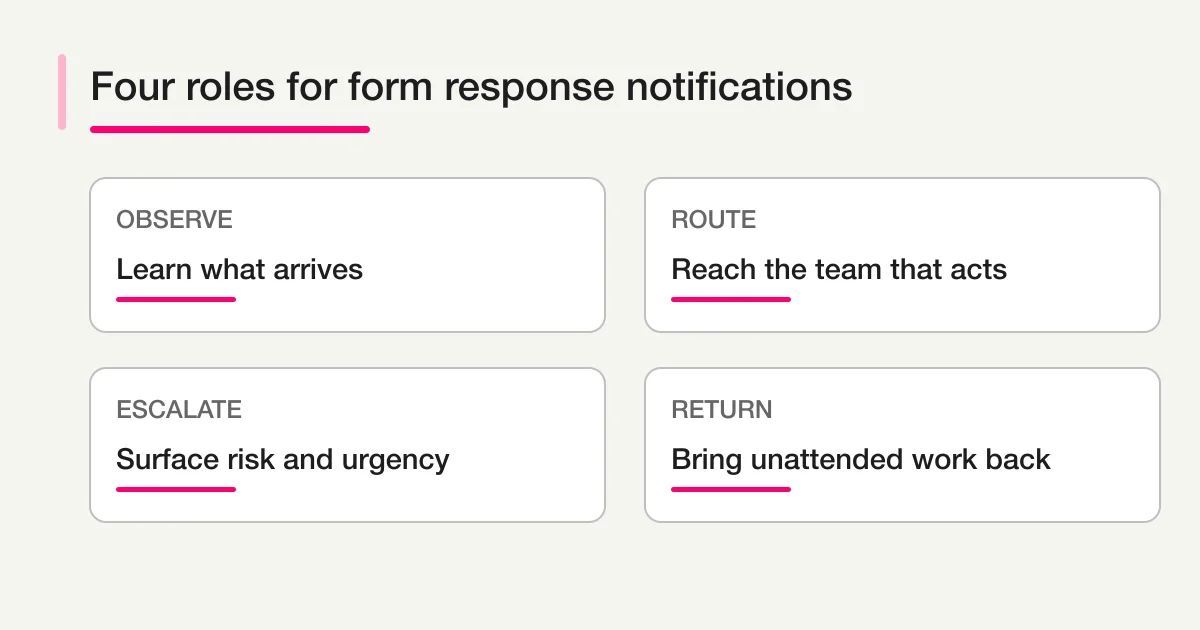
Most teams can classify response notifications into four groups.
| Notification class | Purpose | Example trigger | Expected action |
|---|---|---|---|
| Observation | Learn what arrives | Every response during a short pilot | Inspect patterns; no SLA yet |
| Routing | Deliver work to the right team | Category or form type matches | Confirm owner |
| Exception | Surface risk or uncertainty | Urgent, low score, missing owner | Review promptly |
| Digest | Return unattended work | Open beyond threshold | Assign, update, or close |
Do not send all four into one undifferentiated channel.
Observation is temporary. Routing is team-specific. Exceptions need clear urgency. Digests summarize a queue and should usually run on a schedule.
Once you know which class a message belongs to, decisions about channel, wording, and frequency become much easier.
Use all-response notifications only for a short pilot
All-response notifications are useful when a form is new and the team does not yet understand its traffic.
Run the pilot long enough to answer:
- How many submissions arrive per day and at what times?
- Which categories are common?
- Which fields are actually useful for routing?
- How often are responses tests, spam, or sales pitches?
- Which messages lead to immediate action?
- Which team members need access to the underlying record?
Then move away from all-response delivery.
A notification stream should become more selective as the team learns. If volume rises and the policy never changes, the channel becomes an unofficial archive that nobody can reliably search or own.
Define conditions from business action
A useful condition is not “the message sounds important.” It is an observable reason to act.
Examples:
selected_category = pricing
requested_start_date is within 14 days
score <= 2
owner is empty after triage
status = new for more than 4 business hours
AI category = urgent AND confidence != low
Combine deterministic fields with AI interpretation carefully. A numeric score or selected category can trigger a rule directly. An AI urgency label should include evidence and an uncertainty route.
When the model is uncertain, send the item to a review queue rather than the emergency channel. Otherwise, over-alerting teaches the team that “urgent” does not mean urgent.
Every message needs an action contract
Before writing the message, finish this sentence:
The person who receives this notification should ______.
Possible answers include:
- Claim the inquiry.
- Confirm the proposed category.
- Review a low-score comment.
- Contact the applicant before a deadline.
- Resolve missing information.
- Open the source record and update status.
If no action exists, the information may belong in a dashboard or report instead of Slack.
The action contract should also define a deadline and completion signal. A reaction emoji may feel convenient, but it is a weak system of record. In FORMLOVA, keep the native response status in new, in_progress, resolved, or spam, and use notes, tags, or spam_label for supported context. If the team needs an owner, SLA deadline, acknowledgment, or additional operating state, keep it in a linked external ledger or another documented custom operating layer keyed by the FORMLOVA response ID. The Slack message can link to the relevant source and ledger entry.
What a useful notification contains
Keep the message concise enough to scan and complete enough to decide whether to open the source.
Recommended fields:
Reason: High-intent pricing inquiry
Form: Enterprise consultation
Submitted: 2026-08-13 10:42 UTC
Summary: Wants to replace a manual intake process before October.
Category: Sales (AI suggestion; medium confidence)
Priority: High (deadline within 60 days)
Owner: Unassigned
Action: Confirm owner by 12:00 UTC
Source: [Open response]
The reason and action should appear near the top. Do not begin with every raw field.
Include the original response link for verification. If access is restricted, the link should preserve that restriction rather than copying sensitive content into a broader channel.
Avoid placing webhook URLs, credentials, full payment information, passwords, access tokens, or unnecessary personal data in the message. Slack's official webhook documentation treats the webhook URL as a secret and warns against sharing it in public repositories.
Slack and Sheets have different jobs
The same response may need both a notification and a log, but the destinations serve different purposes.
| Surface | Best use | Poor use |
|---|---|---|
| Slack | Attention, routing, exceptions, discussion | Complete archive or canonical status |
| Google Sheets | Append-only operational log, review view, lightweight analysis | Real-time urgent attention |
| FORMLOVA | Source response, search, native status (new / in_progress / resolved / spam), notes, tags, and spam_label | Native owner/SLA columns or arbitrary extra states |
| External ledger or custom operating layer | Owner, SLA deadline, acknowledgment, extra queue states, and reconciliation by response ID | Replacing the original response content |
This division prevents a common failure. A Slack message disappears in channel history, so someone adds a Sheet. Then edits occur in the Sheet, while the original form service still shows a different status. Nobody knows which copy is authoritative.
Choose one source of truth for each type of state. FORMLOVA remains the source response and native-status record; the linked ledger owns any additional owner/SLA model. Treat Slack as an attention surface. The form response handoff guide explains how to define those roles across Sheets, CRM, and Notion.
FORMLOVA's Slack and Sheets logging workflow is useful when you want the notification and durable log to be designed together.
Route by responsibility, not by organizational curiosity
Sending every response to a large shared channel feels transparent. It often produces collective non-ownership.
Create channel rules around the team that can act:
- Sales inquiries to a sales intake channel.
- Product feedback to a product-feedback review channel or digest.
- Security or privacy issues to a restricted escalation path.
- Recruiting responses to a private recruiting channel.
- Low-score survey comments to a customer-experience review queue.
Do not copy a response into multiple channels unless each has a different action. Cross-posting creates duplicate conversations and makes completion difficult to prove.
If several teams need awareness but only one owns the response, send the operational message to the owner channel and include aggregate trends in a scheduled report for everyone else.
Separate owner suggestion from owner confirmation
AI can propose an owner based on message content. A rule can also map a selected category to a team. Neither automatically proves that a particular person accepted responsibility.
Track at least two concepts:
owner_candidate: solutions-team
owner: unassigned
The notification can say “Suggested owner: Solutions.” A person or deterministic assignment rule confirms the actual owner. In the linked ledger or custom operating layer, the queue state can then change from triaged to assigned; those are not additional native FORMLOVA status values.
FORMLOVA's inquiry owner assignment workflow supports this operational distinction.
Design urgent alerts as a separate lane
An urgent lane needs stricter conditions and fewer recipients.
Use it for events such as:
- A security or privacy concern.
- A time-sensitive service failure.
- A credible cancellation or refund escalation.
- A high-value request with a near deadline.
- A critical score plus an explanation that indicates immediate risk.
Require evidence in the alert. Avoid a bare URGENT label created by AI.
Urgency reason: Customer reports that submitted data is visible to another user.
Evidence: Exact sentence from the response.
Confidence: High
Required action: Security owner to acknowledge within 15 minutes.
Sensitive categories should route to restricted channels or internal systems with appropriate access. The general customer channel does not need the full content.
Low-score alerts need context
A score threshold is easy to automate but can create noise.
A rating of two may describe a small preference, a serious service problem, or an accidental click. Add context:
- Which question produced the score?
- Did the respondent provide free-text detail?
- Is the respondent identifiable and contactable under the stated consent?
- Is there already an open case?
- Does the comment contain a clear request for contact?
For higher volumes, send immediate alerts only when a low score is paired with actionable text or an important segment. Put the rest in a daily review.
Unhandled-response notifications work better as digests
Sending a new alert every hour for the same unattended response creates notification debt.
A scheduled digest can group items by reason:
3 responses have no owner
2 high-priority responses are past due
5 responses are waiting for customer confirmation
1 response failed downstream handoff
Each item should link to the FORMLOVA source and show age, owner, and next action from the linked operating layer. A digest is useful only if those two records are reconciled by response ID.
FORMLOVA's unanswered inquiry digest is designed for this return-to-queue pattern.
Include stop and suppression rules
Notification design must say when not to send.
Typical suppression rules include:
- Test responses from approved addresses.
- Confirmed spam or sales pitches.
- Duplicate delivery of the same event.
- Responses already assigned and acknowledged.
- Closed, archived, or excluded items.
- Maintenance windows or paused workflows.
- A maximum repeat frequency for the same unresolved item.
Use a stable response or event identifier for deduplication. A retry after a temporary error should not create a second message if the first one was already accepted.
Plan for Slack delivery failures
Slack is an external dependency. A successful form submission must not disappear because Slack is unavailable.
Record the response first. Then attempt the notification. Track delivery outcome separately.
Slack documents multiple webhook failure responses and HTTP 429 rate limiting with a Retry-After header. A production integration should distinguish retryable failures from configuration failures. For example, a temporary rate limit may be retried after the instructed delay; an invalid payload needs correction; an archived channel needs an operator decision.
Do not retry forever. After a bounded number of attempts, move the notification to an error state and surface it in an operational digest or dashboard.
A rollout sequence that protects attention
- Name the notification class: observation, routing, exception, or digest.
- Define the recipient and required action.
- Choose the durable source of truth.
- Select the minimum message fields.
- Remove unnecessary personal data.
- Define conditions and uncertainty handling.
- Add deduplication, stop rules, and delivery state.
- Run a short all-response pilot in a test channel.
- Measure volume, acknowledgments, and ignored messages.
- Move to conditional routing and scheduled digests.
During the pilot, ask reviewers which fields they used to decide. Remove fields that are never used. Add only the context that changes action.
Metrics that reveal notification quality
Count more than messages sent.
- Notifications per eligible response.
- Percentage acknowledged within the target time.
- Percentage that resulted in an owner assignment.
- False urgent rate.
- Duplicate notification rate.
- Delivery failure and retry rate.
- Unhandled responses before and after the policy.
- Channel volume by notification class.
If message volume rises while assignment and response time do not improve, the notification policy is not helping.
Common mistakes
Repeating the entire form in Slack
Long messages are difficult to scan and may expose unnecessary personal data. Show the reason, summary, action, and source link.
Using Slack reactions as the only state
Reactions can support conversation, but durable ownership belongs in the linked ledger or documented custom operating layer. Completion should be reflected deliberately in both that layer and FORMLOVA's native resolved status when the work is truly complete.
Putting setup and policy into one undocumented workflow
Credentials, formatting, routing logic, and operational ownership change at different rates. Document the policy independently from the connection steps.
Treating delivery as completion
An HTTP success means Slack accepted a message. It does not mean a person read it, claimed it, or resolved the response.
Alerting without a stop condition
Repeated alerts for the same case train people to ignore the channel. Define acknowledgment and suppression behavior.
Final takeaway
A useful Slack notification is a controlled interruption.
It identifies why the response matters, reaches the team that can act, asks for a specific next step, and links back to durable state. Observation alerts help during a pilot. Conditional routing handles normal work. Exception alerts protect urgent cases. Digests bring unattended work back into view.
Keep the full record outside Slack. Separate suggested ownership from accepted ownership. Protect sensitive data. Treat delivery failure as an operational state.
When you are ready to implement the connection, continue with the Slack notification setup guide. To design the wider post-submit system, use the form automation guide and the post-submit workflow guide.
You can start with FORMLOVA, review the MCP setup guide, or inspect the MCP demo.
Disclosure and Verification
- This is a FORMLOVA first-party design guide. FORMLOVA behavior is based on the current product repository and specification.
- I reviewed Slack's official incoming webhook documentation for webhook secrecy, delivery behavior, message formatting, and error responses.
- I reviewed Slack's official rate limit documentation for current HTTP
429,Retry-After, and message-posting guidance. Slack may change these limits and interfaces, so verify them before implementation. - Do not place secrets or unnecessary personal data in Slack messages. Apply your organization's retention, access, privacy, and incident-response policies.