
Last updated: June 17, 2026
When a Google Forms auto-reply does not arrive, the first thing to check is not the email copy.
Google Forms' built-in path is mainly about sending respondents a copy of their answers. A custom confirmation email with your own subject, response timeline, support address, resource link, or conditional message usually requires Apps Script, an add-on, another form service, or a workflow tool such as FORMLOVA.
That means "not delivered" can mean several different things.
The response receipt may not be configured. The form may not collect the respondent's email address. The Apps Script trigger may not run. Authorization may be missing. The recipient mapping may be empty. A quota may have been reached. Or the message may be blocked by the recipient's mailbox rules.
This guide gives you the diagnostic order. The broader setup path for auto-reply copy, preview, testing, and plan boundaries lives in the parent form auto-reply email setup guide.
Quick Answer: "Enabled" Is Not the Same as Delivered
Check the delivery chain in this order.
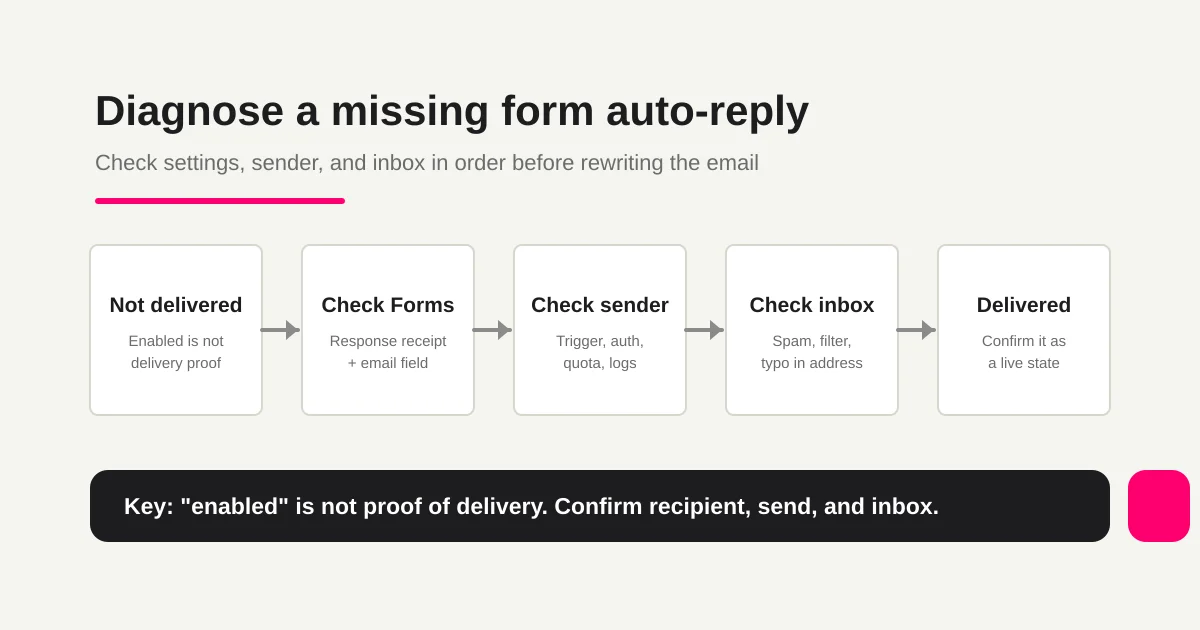
| Step | Check | Common failure |
|---|---|---|
| 1 | Google Forms response receipt settings | A response copy is being confused with a custom auto-reply |
| 2 | Respondent email address | Email collection is off, or the recipient field is missing |
| 3 | Apps Script or add-on sending process | Trigger, authorization, recipient mapping, or execution log problem |
| 4 | Sending quota and sender identity | MailApp/GmailApp quota, sender, or domain issue |
| 5 | Recipient side | Spam folder, company filter, forwarding, typo |
| 6 | Workflow state | A test worked, but live submissions were never checked |
"Auto-reply is enabled" is not delivery evidence.
You need to know whether the system had a recipient, whether a sending process ran, whether the provider accepted the message, whether the inbox received it, and whether the message still matched the operational promise.
What Google Forms Response Receipts Can Actually Do
Start with the built-in Google Forms response receipt.
That feature is useful when respondents need a copy of the answers they submitted. It is not the same as a fully custom confirmation email.
Check three things.
| Check | Why it matters |
|---|---|
| Email collection is enabled | Google Forms needs a respondent email address |
| Response receipt setting is configured | The form must be set to send respondents a copy |
| The expected message fits the feature | A response copy is not a custom operational confirmation |
If this is enough, avoid adding Apps Script just to add complexity.
If you need a message like the one below, you are outside the basic response receipt use case.
Thanks for contacting us.
We received your inquiry and usually reply within two business days.
For urgent questions, contact support@example.com.
That is a custom auto-reply. Many Google Forms teams build it with Apps Script.
What to Check When Apps Script Does Not Send
Do not debug only the message body.
Apps Script delivery often fails outside the copy.
| Check | Failure example |
|---|---|
| Trigger | The function exists, but no installable form-submit trigger was created |
| Authorization | The script was never authorized after trigger setup |
| Event object | A Forms event and a linked-Sheets event are being mixed up |
| Recipient mapping | The question or column name changed, so the email address is empty |
| Execution logs | The trigger is failing, but nobody checks the log |
| Quota | MailApp or GmailApp has hit a daily sending limit |
The most confusing failures are those where a manual test worked.
Your own Gmail address received the test. A company address did not. Manual execution worked. Form-submit execution did not. One submission delivered. A busy event day only delivered some of them.
Those are not copywriting problems. They are trigger, authorization, sender, quota, or recipient-side problems.
If the same Google Forms stack also carries Sheets, Slack notifications, auto-replies, owner columns, and status fields, use Google Forms + Sheets + Apps Script Operations to decide where each responsibility should live before adding another script.
Separate Spam Filtering from Sender-Side Failure
If the sending process ran, check the recipient side.
Do not check only the inbox.
Spam folder
Promotions or automatic filtering tabs
Company mail gateway
Forwarded mailbox
Typos in the submitted email address
Company, school, government, and enterprise inboxes can block or quarantine messages that personal Gmail receives normally. If the same message reaches Gmail but not a corporate domain, the mailbox administrator may need to inspect filtering or sender rules.
Also check the address itself. If the respondent mistyped it, the form cannot magically recover.
Use an email field rather than plain text, and validate the address at the form level when possible. The broader field-design framework is covered in the Form Field Examples Guide.
How FORMLOVA Treats Auto-Reply as State
In FORMLOVA, auto-reply is not treated as only email copy.
It is state.
| State | What to confirm |
|---|---|
| Setup | Auto-reply is enabled and a template exists |
| Approval | The edited copy was previewed and approved |
| Recipient | The respondent email field is correctly mapped |
| Send attempt | The send process ran after submission |
| Result | Sent, failed, suppressed, or not sent are distinguishable |
| Operations | Reply-to, response timing, and team notification do not contradict the form |
An auto-reply is the first promise after submission.
So the job is bigger than writing a nice message. Preview, approval, test sending, and live-state checks all matter.
When you want different first replies by inquiry category, Inquiry Auto-Reply by Category is the nearest workflow. For reservation or signup confirmation over Gmail, use Gmail Reservation Confirmation. For event reminders and follow-up after the initial confirmation, use Event Reminder + Follow-up.
Checklist to Prevent the Same Failure
Once the message arrives once, do not stop there.
Forms change after launch. Copy changes. Response times change. Resource URLs change. Event links change. Owners change. Notification rules change. Email limits matter.
If the team also needs a visible alert when a response arrives, separate the respondent email from the team workflow and use the Google Forms to Slack notification guide for that route.
Before launch and after copy changes, check:
The form collects the respondent email address.
You are not confusing response receipts with custom auto-replies.
Apps Script triggers, authorization, logs, and quotas are checked when script is involved.
Testing uses conditions close to live submissions.
Spam folders and company filters are checked.
Reply-to points to an inbox someone watches.
Respondent auto-reply and team notification are designed separately.
If the issue is not only the email but the whole follow-up process, read response status management and post-submit workflow design. They keep the team from making email carry every operational responsibility.
FAQ
Can Google Forms send an auto-reply email by itself?
Google Forms can send respondents a copy of their responses when the relevant email settings are used. For a custom confirmation email with your own subject, body, response timing, resource links, or conditional copy, you usually need Apps Script, an add-on, another form service, or FORMLOVA.
What should I check first when an Apps Script auto-reply is not sent?
Check the installable form-submit trigger, authorization, execution logs, recipient mapping, and sending quota. Manual execution success does not prove that the form-submit trigger is working.
Why do I receive the test email, but respondents do not?
The test condition may not match production. The recipient may be hardcoded, the respondent email may not be collected, the company mailbox may block it, or the submitted address may contain a typo.
Can I use custom auto-replies on FORMLOVA Free?
Custom auto-reply email is available on Standard or higher. The Free plan can still create forms, collect responses, search responses, manage response status, and export CSV / Excel files.
Official Sources Checked
- Google Docs Editors Help: View and manage form responses
- Google Apps Script: Installable triggers
- Google Apps Script: MailApp
- Google Apps Script: Quotas for Google Services
Read Next
- How to Set Up Form Auto-Reply Emails
- FORMLOVA Form Automation Guide
- Google Forms + Sheets + Apps Script Operations
- Response Status Management
- Post-Submit Workflow Design
Disclosure and Verification
This guide is for teams troubleshooting Google Forms response receipts, Apps Script auto-replies, and missing confirmation emails. I work on FORMLOVA, so the workflow examples use FORMLOVA directly. I checked Google Forms response management, Apps Script triggers, MailApp, quota documentation, and FORMLOVA auto-reply operation notes on June 17, 2026. Google UI, delivery behavior, pricing, and limits can change, so confirm current official documentation before implementing production workflows.