
Last updated: 2026-08-31 Last verified: 2026-08-31
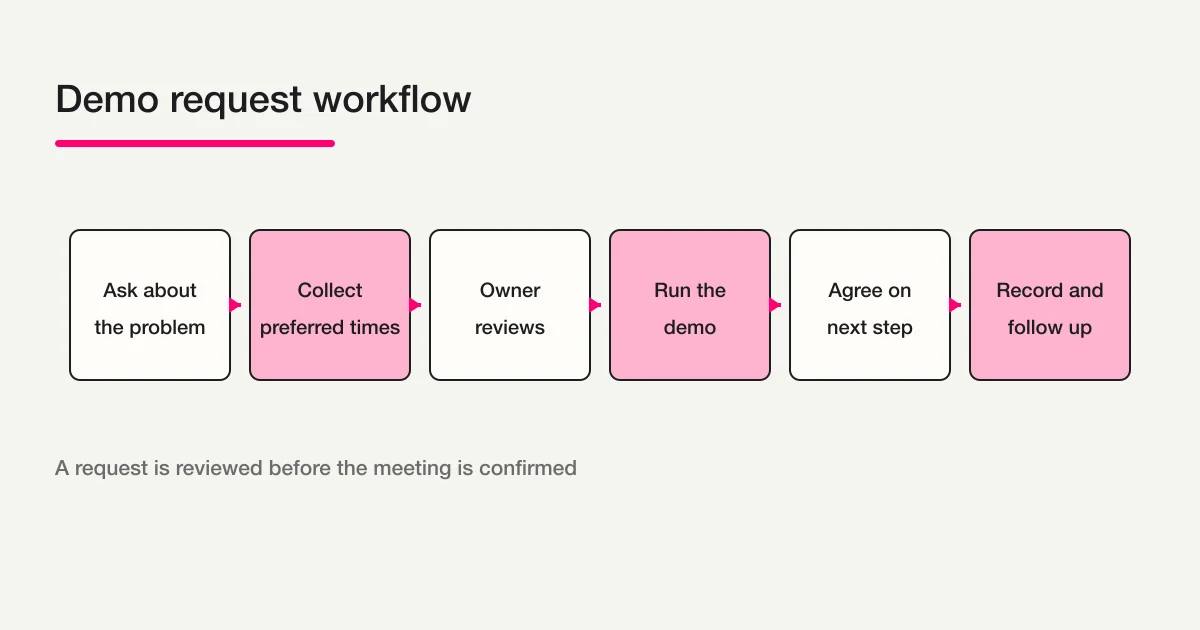
A demo request form is not always a calendar booking form. If your team needs to understand a prospect’s problem, product fit, implementation timing, or preferred meeting format before confirming a time, collect the request first and let a human owner schedule the meeting.
That is different from an instant-booking tool that exposes available slots and reserves one immediately. Both can be useful. The important thing is to make the promise visible: is the submission a confirmed booking, or will a representative review it and reply with options?
With a FORMLOVA-connected MCP client, you can create a draft from your phone, review the respondent preview, complete the publication checks, and manage the responses after launch. This guide keeps the field set small enough to submit while still giving the owner enough context to prepare a useful demo.
The short answer: choose the scheduling promise first
Decide what happens after the form is submitted.
| Intake model | Best fit | What happens next |
|---|---|---|
| Show availability and confirm a slot immediately | Booking or calendar software | The booking system handles availability, changes, and cancellations |
| Review the problem before choosing a demo time | Demo request form | An owner reviews the response and confirms a time separately |
| Gather commercial conditions first | Quote request form | The team reviews budget, quantity, delivery, and scope |
| Send material before a conversation | Resource request form | Document delivery and follow-up are kept distinct |
If real-time availability and collision-free slot confirmation are the main job, start with the reservation form guide. This page is for a request that a person reviews before the meeting is confirmed.
Step 1: define the demo audience and purpose
Write one sentence describing who should submit and what the demo should help decide.
Create a product-demo request form for people evaluating a SaaS tool. Ask about their current problem, implementation timing, preferred demo format, and two preferred time windows. A submission is a request, not a confirmed appointment; an owner will review it and reply with scheduling options.
What comes back
The first draft can include a title, audience, expected demo length, post-submit message, and initial questions. Keep it private while you check whether the sales team can act on the answers.
What to check on the phone
Open the respondent preview and read the introduction. It should explain what will be shown and whether the owner will confirm the date later. Do not let the title “Book a demo” imply an immediate reservation if that is not what happens.
Small note
A clear promise prevents an avoidable handoff problem. “Request a demo” and “Book an available slot” are different calls to action and should not share the same completion message.
Step 2: choose the minimum qualification fields
Do not reproduce every column in an internal sales sheet. Start with the information needed to reply and prepare the first conversation.
| Field | Required or optional | Why it helps |
|---|---|---|
| Name and email | Required when a reply is needed | Return scheduling options and questions |
| Company and team | Required when relevant to B2B routing | Identify context and owner |
| Current problem | Usually required or strongly encouraged | Shape the demonstration |
| Product area or use case | Usually required | Keep the first call focused |
| Implementation timing | Prefer a short choice list | Set follow-up priority |
| Preferred time | First and second preference | Give the owner a starting point |
| Meeting format | Choice list | Prepare the right channel |
| Phone number | Optional unless there is a reason | Explain why a call may be used |
| Additional context | Optional open text | Capture a detail the choices miss |
An easy timing list might be:
Actively evaluating now
Within one to three months
Within six months
Researching, no date yet
Preferred times are not necessarily booked slots. Label them as first and second preferences, add a timezone when it matters, and say that an owner will confirm the meeting separately.
What comes back
Your FORMLOVA request can return a question list with answer types and required or optional states. If you cannot explain why a company name or phone number is required, make it optional or remove it.
What to check on the phone
Tap every choice in the respondent view. Make sure timing options are distinct, the preferred-time wording cannot be mistaken for a confirmed booking, and the open-text field is not longer than the context requires.
Small note
If you need budget, quantity, delivery date, specifications, or an attachment for a quote, use the quote request form guide as the boundary. Adding every quote field to a first demo request increases the effort before the prospect can submit.
Step 3: create the draft in FORMLOVA
Once the purpose and fields are clear, ask a connected MCP client to create the draft.
Create a demo and consultation request form with name, email, company, current problem, product area, implementation timing, first and second preferred time windows, meeting format, and an optional context field. Explain that submission is not a confirmed appointment and that an owner will review the request before replying with a time.
What comes back
The draft response includes a respondent preview and a post-submission preview. Revise the order or wording before publication if a prospect cannot tell what will happen next.
What to check on the phone
Open the respondent preview in a mobile browser and complete it as if you were a prospect. Check the introduction, timing choices, required marks, open-text field, and post-submit message rather than relying only on creator settings.
Small note
The FORMLOVA form creation guide is the parent map for choosing a use case. This page narrows that map to a demo and sales-consultation request.
Step 4: check the preview, then test the handoff after publishing
Before publishing, use the preview to check the display and wording. Send a real dummy response only after publishing, because an unpublished preview does not save responses.
- Before publishing, open the preview and confirm that company, problem, timing, and preferred slots are clear to the respondent.
- After publishing, send one dummy response from the public URL and confirm that the owner can read the company and problem in the response list.
- The respondent receives a clear receipt and next-step message.
- The form does not imply that a meeting is confirmed before review.
- Duplicate candidates and sales pitches can be reviewed separately from useful requests.
- An unanswered request remains visible when the owner is unavailable.
What comes back
When you request publication, the current review response tells you what still needs attention. Open the form and post-submit previews, confirm duplicate-response handling, choose the privacy-policy requirement, and decide how to handle sales-email detection when text fields are present.
What to check on the phone
After publication, close the editor and open the public responder URL on a separate device or private browser. Confirm that a prospect can start a real response and that the URL is not an editor or preview route.
Small note
If you send a confirmation message before an owner checks the request, call it a receipt, not a confirmed appointment. Keep “we received your request” separate from “your meeting is scheduled.”
Step 5: define the owner and response states
A demo form is useful only when the next person can act on the response.
| Condition | Initial state | Owner action |
|---|---|---|
| Every new request | New | Check context and duplicate candidates |
| Clear problem and near-term timing | In progress | Prepare the demo and offer times |
| Research with no date | New or note added | Decide whether to send material or follow up later |
| Possible sales pitch | Needs review | Separate it from a genuine request |
| Scheduling is pending | In progress | Confirm availability in the calendar or booking system |
FORMLOVA response management can support keyword search, response status, notes, tags, and CSV or Excel export. Use the native states new, in_progress, resolved, and spam consistently, and write down what each means to your team.
Notifications should also have a condition and an owner. Sending every response to every representative creates noise. Route by use case, timing, or meeting format only when the rule is stable and someone knows what to do next. For the wider post-submit design, read the FORMLOVA form automation guide.
Related Workflow: Demo Request Handoff
If the next step is to pass a request to an owner, organize the company, problem, and preferred times, and prepare scheduling follow-up, the Demo Request Handoff Workflow is a relevant starting point. It is an official FORMLOVA Workflow for reviewing a response and preparing a sales handoff note, first reply, and next-action due date. It does not promise calendar availability, an instant booking, or a closed deal; align the form fields, notification destination, and human review step before using it.
Step 6: separate the follow-up stages
Keep at least three messages or operating stages distinct:
- Receipt: confirm that the request arrived and explain the next review step.
- Scheduling: after the owner checks the problem and timing, offer suitable options or a booking route.
- After the demo: record the agreed next action, materials, questions, and owner.
Match contact use, consent wording, and opt-out handling to your own policy. A form answer is context for a conversation, not proof of a purchase intention.
When exporting, include only the columns the receiving team needs, such as name, email, problem, preferred time, state, and owner note. Decide who can access the file and how long it is retained; do not make an unrestricted duplicate of every response in a separate sales sheet.
A ready-to-adapt demo request template
Title: Product demo and consultation request
Introduction: We will review your goals and reply with scheduling options. Submitting this form does not confirm an appointment.

Q1. Name
Q2. Work email
Q3. Company
Q4. What problem are you trying to solve? (Short answer)
Q5. Which use case are you exploring? (Choose one)
[ ] Demo or consultation  [ ] Contact intake  [ ] Registrations  [ ] Surveys  [ ] Other
Q6. When are you considering implementation? (Choose one)
[ ] Now  [ ] Within one to three months  [ ] Within six months  [ ] No date yet
Q7. Preferred demo time, first choice
Q8. Preferred demo time, second choice (Optional)
Q9. Meeting format (Choose one)
[ ] Online  [ ] On site  [ ] Decide together
Q10. Anything we should know before the call? (Optional)
Add a title, role, employee count, budget, phone number, or attachment only when the owner will use that information in a defined next step.
Common mistakes and fixes
The form sounds like a confirmed booking
If the form only collects preferences, do not call the completion screen “booking complete.” Say that the request was received and that an owner will confirm a time.
Every sales field is required
Requiring title, employee count, budget, and phone before the first conversation can block early-stage prospects. Keep required fields to reply and prepare; use optional or choice fields for qualification.
Preferred time is an unstructured sentence
“Next week sometime” is hard to schedule. Ask for first and second preferences, a time window, and a timezone when needed. Do not say that the form has reserved a slot unless another system actually did so.
Everyone receives every notification
Define the owner and condition before enabling notifications. Separate sales pitches and unclear submissions for review instead of making the whole team read them.
The post-demo action is lost
Keep a response state, owner note, next contact date, and shared material where the next person can find them. “Demo completed” alone is not a follow-up plan.
FAQ
What is the difference between a demo request form and a booking tool?
A booking tool usually exposes availability and confirms a slot immediately. A demo request form collects context first, then lets a human owner choose and confirm the time. Make the difference clear in the title, introduction, and completion message.
Which fields are essential for a demo request form?
Name, email, current problem, use case, implementation timing, and a preferred time are a practical starting point. Add company details when they affect routing. Add phone, budget, title, or attachments only when someone will use them.
Does asking for a preferred time reserve the meeting?
No. A preferred time is a request unless a booking or calendar system actually reserves the slot. Tell the respondent that an owner will check availability and reply.
How should I handle duplicates and sales pitches?
Review duplicate candidates instead of deleting them automatically, and define how sales pitches are separated from real requests. Use response status, notes, tags, and any configured sales-email detection consistently before notifying or exporting.
Can FORMLOVA create a demo request form?
Yes. You can organize a draft, respondent preview, publication review, response search, status and note management, and CSV or Excel export as one operating flow. Calendar availability, CRM-specific updates, and the meeting outcome remain separate operations that should be confirmed before launch.
If you want to try a demo-request draft and owner handoff, start FORMLOVA for free.
Read next
- FORMLOVA Form Creation Guide: the parent map for choosing a form use case.
- FORMLOVA Form Automation Guide: notifications, auto-replies, and post-submit handoff.
- Contact Form Operations Guide: owners, statuses, replies, and sales-pitch review.
- Quote Request Form Guide: budget, quantity, delivery, and scope conditions.
- Reservation Form Guide: confirmed slots versus requested times.
- Resource Request Form Guide: document delivery and lead follow-up.
Reference links
Disclosure and Verification
On August 31, 2026, I reviewed the blog inventory, cluster registry, Search Console snapshots, the full Rakko keyword raw data, and the resource-download, quote-request, client-intake, reservation, and contact-operations guides. The descriptions of FORMLOVA drafts, previews, publication review, response search, status, notes, notifications, and export follow the current product specification and implementation scope. Calendar booking, CRM updates, sales outcomes, and legal decisions should be checked against the services and policies used by your team.