
Phone Message Template: A Completed Example for an Absent Colleague
A phone message should record when the call arrived, who it was for, who called, the purpose, the caller's callback preference, confirmed contact details, and who took the call. If you also track the handoff, give message delivery and the next internal check their own fields. A caller's preferred time should remain a request until the responsible colleague confirms what they can do.
Start with the blank template below. It works in a document, on paper, or as the basis for a form. The completed example uses the same fields for a fictional delivery-time inquiry, so you can see exactly what has been established and what still needs checking.
Copy this phone message template
This version separates information collected during the call from the internal steps after the call. Keep that division even if you shorten the template for a small office. The person reading the message should be able to identify the caller's request without interpreting an internal status label.
PHONE MESSAGE
Date and time received:
For (department or colleague):
Caller (organization/department and name):
Purpose (the subject and what needs checking):
Caller preference: Callback requested / Caller will call again /
                   Message only / Not confirmed
Preferred time or available time window:
Callback contact:
Contact check: Repeated back and confirmed / Not confirmed /
               No callback needed
What I told the caller:
Information still unconfirmed:
Message taken by:

INTERNAL HANDOFF
Message recipient and delivery method:
Date and time passed on:
Handoff status: Not passed on / Passed on, awaiting confirmation /
                Confirmed by colleague
Next internal check: person and time:
What the colleague confirmed and any subsequent action:
“No callback needed” and “I did not ask whether a callback was needed” are different answers. Use “Not confirmed” for something you could not establish. A blank should not quietly become a decision. If the caller plans to call again, record whether they gave a time or left the timing open.
Use only the identifying details the work requires. An internal department or staff label may be enough for the person taking the message. Decide who can see contact details before using a shared record. A template should not automatically collect a personal mobile number simply because it has space for one.
Confirm the caller, purpose, and requested response
The aim is to preserve the facts a colleague needs for the next decision. You do not need a transcript. “About the delivery” gives less help than “Asks whether tomorrow's stationery delivery can move from the morning to after 2 p.m.” The second version identifies both the subject and the question that remains open.
JEED's telephone-transfer training material, in Japanese, covers listening, asking again when something is unclear, repeating information, and preparing a message for the intended recipient. The template applies those basic actions to an ordinary office call. It does not add a field for guesses about what the caller probably meant.
| Detail | Example question | What to record |
|---|---|---|
| Intended colleague | “May I check who you would like to speak to?” | Department and colleague, or that the recipient is unclear |
| Caller | “Could you repeat your organization and name?” | The details heard and anything still unconfirmed |
| Purpose | “Which delivery is this about, and what would you like checked?” | The subject and question in one sentence |
| Preference | “Would you like a callback?” | Requested response and available time window |
| Contact | “Let me repeat that back to check I have it right.” | Contact details and whether they were confirmed |
Dates, times, names, and numbers are useful places to check that both people mean the same thing. The Fukuoka Labour Bureau's telephone-communication guidance, also in Japanese, discusses repeating and noting details such as dates, places, telephone numbers, and the responsible person's name. Neither source establishes every field in this article as a mandatory official form.
If a caller asks for a reply by noon, you have learned their preference. You have not learned whether your colleague can meet it. “I have noted that you would like a reply by noon and will pass that on” has a different meaning from promising a callback by noon. Keep that distinction in both the conversation and the written note.
Completed example: a delivery-time inquiry
This fictional example follows the blank template without adding a separate set of headings. Names and circumstances are illustrative. Instead of inventing a callable telephone number, the contact field shows where a business number confirmed with the caller would go.
| Field | Example entry |
|---|---|
| Date and time received | November 9, 10:20 a.m. |
| For | Purchasing colleague A |
| Caller | Example Supplies, contact B; organization and name repeated back and confirmed |
| Purpose | Asks whether the stationery delivery on November 10 can move from the morning to after 2 p.m. |
| Caller preference | Callback requested |
| Preferred time or available time window | Would like a reply by noon today; colleague A's availability is not confirmed |
| Callback contact | [Business number confirmed with the caller] |
| Contact check | Repeated back and confirmed |
| What I told the caller | Colleague A is unavailable. I will pass on the request so A can check the proposed change and callback timing |
| Information still unconfirmed | Whether the delivery change is possible and when A can call |
| Message taken by | Reception C |
| Message recipient and delivery method | Passed to A through the office's agreed internal channel |
| Date and time passed on | November 9, 10:25 a.m. |
| Handoff status | Passed on, awaiting confirmation |
| Next internal check: person and time | C to check A's confirmation status at 11:30 a.m. |
| What the colleague confirmed and any subsequent action | Not entered yet; to be added after A confirms |
At this point, the supplier has asked about a change and requested a reply by noon. The delivery has not been rescheduled in this record. There is also no evidence that A has called back. Shortening the purpose to “Delivery changed to after 2 p.m.” would turn an unresolved inquiry into an apparent decision.
After the colleague checks the request, record the new information separately. An additional fictional entry could read: “11:40 a.m.: A confirms the change is possible. 11:45 a.m.: A reports having called contact B.” Those are two events, with different meanings. They demonstrate how to extend a note; they are not a claim that this example call actually occurred.
Separate passing on a message from confirming it
Sending a message does not tell you whether the recipient has read it. Before several people use the template, agree what each handoff status means. A short, shared definition is more useful than a long list of similar labels.
| Status | What it establishes | What it does not establish |
|---|---|---|
| Not passed on | The person taking the call has recorded the request | Delivery, confirmation, or action by the colleague |
| Passed on, awaiting confirmation | The message was sent through the agreed channel | That the colleague has read it or acted |
| Confirmed by colleague | The colleague has confirmed the message contents | That a callback or answer to the inquiry is complete |
If you need to follow the callback too, add who did what and when in the final field. “Handled” alone could mean “read,” “called,” or “asked another person to check.” A specific entry lets the next reader understand the actual step without asking the receptionist to reconstruct the call.
The next internal check is another distinct time. In the example, noon is the caller's requested reply deadline; 11:30 a.m. is reception's planned check. Neither time automatically commits A to a callback. If confirmation is still missing as the requested time approaches, use the office's agreed escalation or contact procedure.
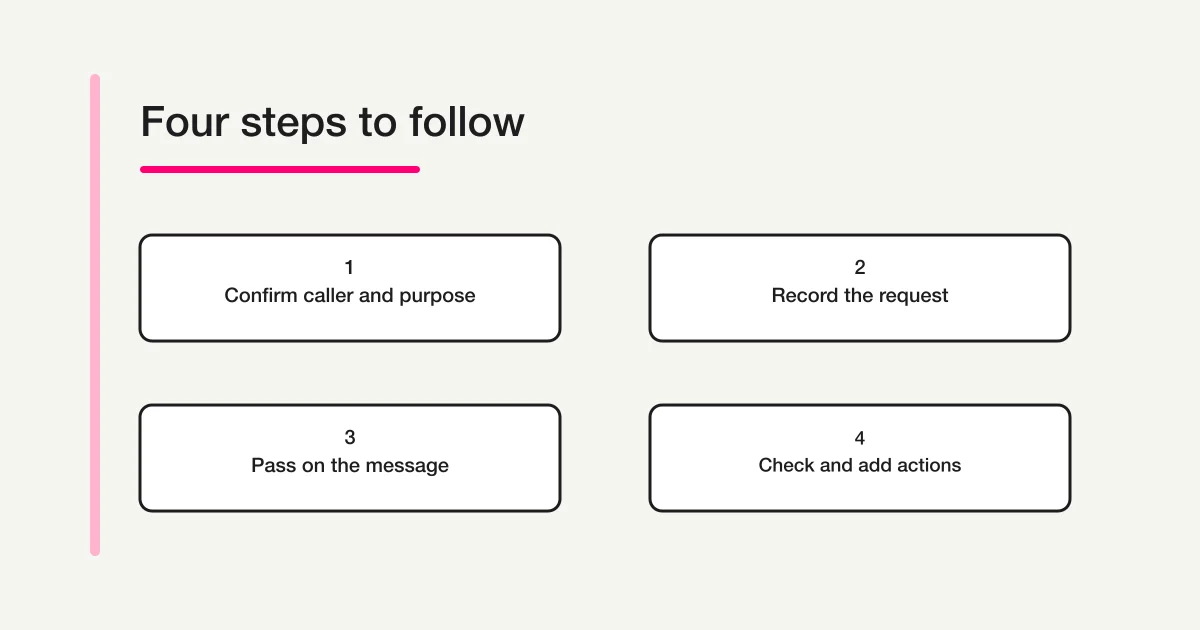
This diagram explains a recordkeeping flow. It is not a FORMLOVA screen for answering calls or making automatic callbacks. If the task is to transfer a colleague's continuing responsibilities rather than pass on one call, the work handover template and example covers the broader background and decision conditions.
Try the same fields in an unpublished form draft
When each person writes notes in a different order, try turning the blank template into consistent input fields. FORMLOVA is a service for creating and managing forms through a supported AI chat. For this exercise, begin with an unpublished draft and one fictional call. The immediate goal is to check the fields, rather than replace the whole reception process.
The Free plan lets you try form creation and response collection. Your AI client's access requirements and charges are separate. Registration does not automatically create a phone-message form: register, verify your email, connect a supported AI chat, and then make the request. The form creation guide explains how to decide what a form needs to collect.
Create an unpublished form draft for internal telephone messages. Include the date and time received, intended colleague, caller's organization and name, purpose, callback preference, preferred time window, callback contact, whether the contact was confirmed, what the receptionist told the caller, unconfirmed information, and who took the call. Use these caller preferences: callback requested, caller will call again, message only, and not confirmed. In a separate internal handoff section, include recipient and delivery method, date and time passed on, handoff status, next check person and time, and a field for later actions. Use these handoff statuses: not passed on, passed on awaiting confirmation, and confirmed by colleague. Do not label a caller's preference or a saved record as a promise or completed callback. Use a fictional delivery-time inquiry to review the fields, without real names or numbers. Do not publish, send notifications or email, or transfer anything to an external service yet.
This is a draft request you can copy, rather than a recorded generation result. Review the fields the AI actually returns. Check that “Not confirmed” is available, that handoff status is separate from the caller's purpose, and that a preferred time has not become a promised callback time. The form field examples guide can help you choose between a short text field and a fixed set of options.
Keep the caller's request and message handoff in separate fields
Use a fictional call to try a free form draft with distinct fields for callback requests, unconfirmed information, and the colleague's confirmation.
Sign up free to try a phone message draft
Register, verify your email, connect a supported AI chat, and use the request above to create an unpublished draft. AI client access requirements and charges are separate.
Start with one message and a second reader
Before changing the team's routine, ask another person to read a fictional completed note. Can they identify who called whom, what needs a decision, what the caller requested, and who checks next? If they need a verbal explanation, revise the field or the sentence that left the gap.
For example, “Tomorrow afternoon” can become unclear when someone reads the record the next day. Use the actual date and a specific time window when the caller provides them. If a detail is uncertain, retain that uncertainty until it is checked. Do not make the message look complete by filling the gap with a plausible answer.
Then decide where real records will be stored, who may view them, and how often outstanding messages will be checked. Creating a draft does not assign a responsible colleague or approve a sharing arrangement. Review the requested contact information before starting real use, and remove fields that are unnecessary for the team's purpose.
Frequently asked questions
Should I start with paper or a form?
Paper is a reasonable way to test the same fields. Check whether a short purpose statement is understandable and whether unconfirmed details remain visible. A form becomes useful when several people need the same field order and options. Move a working structure across instead of adding fields simply because a form can contain them.
What if the caller does not want a callback?
Record the preference, such as “Message only,” and what was actually confirmed. That does not necessarily remove the need to pass the message on internally. Whether the colleague needs to take further action depends on the office's process and the content of the call.
Is a message enough for an urgent call?
Use the workplace's established urgent-contact and decision procedures. This template is for recording ordinary messages for unavailable colleagues. Its status options do not replace decisions about safety, emergencies, or other time-sensitive responsibilities.
Disclosure and Verification
The cited materials and current FORMLOVA specifications were checked on November 9, 2026. The author is involved in developing and operating FORMLOVA. The template, fictional example, draft request, and diagram are original editorial examples. They do not document an actual call, completed callback, or measured operational improvement.
If you are writing an outgoing inquiry instead of recording an incoming call, use the contact message writing guide. For your next phone message, start by separating the caller's request from the facts that have been confirmed.