
Last updated: August 13, 2026
An AI workflow is not simply a prompt followed by an answer. It is a repeatable business process in which AI reads an input, makes a bounded interpretation, and passes the result into an operational next step.
That next step may be a notification, a routing decision, a draft reply, a status change, a record in another system, or a report for a human reviewer. The important part is not that AI appears somewhere in the process. The important part is that the process still has an owner, a state, and a recoverable path when the model is uncertain or wrong.
I use this working definition:
An AI workflow is a designed sequence in which AI performs a limited judgment task between a known input and a controlled business action.
For form operations, the input might be an inquiry, application, booking request, survey response, or uploaded file. AI can summarize it, propose a category, identify urgency, or draft a response. The workflow then records what happened and decides whether to notify a person, request approval, update a system, or wait.
This guide explains how to design that system. If you first need the broader map of what can happen after submission, start with the form automation guide. If you already know the process and need to choose between fixed orchestration and open-ended autonomy, read workflow-based vs autonomous AI agents.
The short answer: separate input, judgment, state, and action
Most AI workflow failures begin with a vague instruction such as “automate inquiries with AI.” That sentence hides four different responsibilities.
| Layer | Purpose | Good AI task | Control that should remain |
|---|---|---|---|
| Input | Capture reliable context | Extract facts from free text | Required fields, consent, source identity |
| Judgment | Interpret ambiguous content | Summarize, classify, score, propose | Thresholds, review rules, exception labels |
| State | Show where work currently stands | Suggest the next state | Durable status, owner, history, rollback |
| Action | Move work forward | Draft a message or recommend a route | Sending, deletion, publication, high-impact changes |
This separation makes the workflow understandable. It also prevents a model output from silently becoming an irreversible action.
Suppose a pricing inquiry arrives. AI can extract the requested timeline, summarize the use case, and propose sales / high intent. The workflow can store those suggestions next to the original response. A rule can alert the sales channel because the confidence and business conditions match. A person can confirm ownership and send the reply.
The model helps with reading. The system owns state. The person owns consequential execution.
AI workflows are different from traditional automation
Traditional automation is strongest when the condition is explicit.
When a response is submitted
-> send a receipt
-> add a row to a log
-> notify the operations channel
Every step can be described with deterministic rules. The same input produces the same path.
AI becomes useful when one step requires interpretation:
When a response is submitted
-> read the free-text request
-> propose category, urgency, and owner
-> attach a short evidence-based summary
-> route uncertain cases to review
-> notify only the relevant team
The AI does not replace the workflow. It fills the narrow space where fixed rules become brittle: language, meaning, tone, intent, and incomplete context.
A mature design often combines both approaches. Use rules for facts such as a selected country, an event date, a consent checkbox, or a numeric score. Use AI for a long explanation, a complaint theme, or an ambiguous inquiry type. Combining them is usually more reliable than asking a model to infer everything.
AI workflows are also different from autonomous agents
An autonomous agent is usually allowed to choose more of its own path. It may decide which tool to call, what information to gather next, and when it has enough evidence to continue.
An AI workflow gives the model a narrower job inside a predefined route.
| Question | AI workflow | Autonomous agent |
|---|---|---|
| Who chooses the next step? | The designed process | The agent within allowed boundaries |
| How predictable is execution? | Usually high | More variable |
| Where is it easiest to begin? | Repeated operational tasks | Research and exception-heavy tasks |
| Main safety mechanism | Fixed states, validation, approvals | Permissions, tool policy, logs, limits, approvals |
| Typical form use | Classify, summarize, draft, alert | Investigate across tools and plan follow-up actions |
This is not a contest between old and new architecture. They solve different problems.
A response-triage workflow should normally be predictable. A cross-system investigation into why conversions fell may benefit from an agent that can choose among analytics, form, and campaign tools. The MCP form operations layer explains how an AI client can reach operational tools without turning every task into an autonomous process.
Why form submissions make strong AI workflow inputs
AI performs better when the context is structured before interpretation begins.
An email might contain a company name, budget, deadline, attachment, and consent in any order—or omit them entirely. A form can collect each item in a known field and reserve AI for the part that genuinely requires language understanding.
For example:
company_name: Northwind Labs
request_type: Other
budget_range: $5,000-$10,000
target_date: 2026-10-01
message: We need to replace a manual intake process...
consent: true
The model does not need to guess the budget or consent. It can focus on interpreting the message and proposing a useful route.
Structured inputs also improve auditability. A reviewer can compare the source answer, the AI suggestion, the final decision, and the action taken. That is much harder when the workflow begins with an unstructured conversation and never creates a durable record.
FORMLOVA treats a response as the beginning of operations rather than the end of collection. The detailed lifecycle—from receipt through ownership, follow-up, and completion—is covered in the post-submit workflow guide.
Design the workflow around a decision, not a model feature
Do not start with “Where can we use an LLM?” Start with a recurring decision that costs time or creates risk.
Useful candidates share several properties:
- The task happens often enough to standardize.
- A human currently reads similar material repeatedly.
- The output can be expressed as a small schema.
- Incorrect output can be caught before serious harm.
- The original evidence remains available.
- A measurable operational result exists.
Good first decisions include:
- Which inquiries need attention today?
- Which survey comments share the same theme?
- Which response should go to sales, support, or recruiting?
- Which applications are missing required information?
- Which low-score responses need a personal follow-up?
Poor first decisions include deleting records, making contractual promises, sending individualized legal or financial guidance, publishing externally, or rejecting people without review.
The distinction is simple: automate preparation before authority.
Define a typed output instead of accepting prose
A paragraph from a model may sound useful but still be difficult to operate. Ask the AI step to return a bounded structure.
{
  "summary": "Prospect wants to replace spreadsheet-based intake before October.",
  "category": "sales",
  "priority": "high",
  "owner_candidate": "solutions",
  "confidence": "medium",
  "evidence": ["target date is within two months", "budget range is selected"],
  "needs_review": true
}
The exact field names matter less than the operating principle. The result must be validateable, visible, and usable by the next step.
Avoid asking for an unexplained confidence number. A model-generated percentage is not a measured probability unless you have calibrated it. A small label such as high / medium / low, paired with evidence and review rules, is often more honest.
Human review should be a route, not an apology
Teams sometimes treat human review as evidence that automation failed. I see it differently. A review queue is part of the design.
Create clear review triggers:
- The model returns
needs_review. - Required context is missing.
- A category is sensitive, such as legal, refund, security, hiring, or health.
- The proposed action would contact a person or change an external system.
- The response contains contradictory signals.
- The model output does not pass schema validation.
Then specify what the reviewer can do: confirm, edit, reassign, request more information, or stop the workflow. A reviewer should not have to reconstruct the entire case from a Slack message. Link back to the original response and show the evidence used by the AI.
Start with one of four small workflows
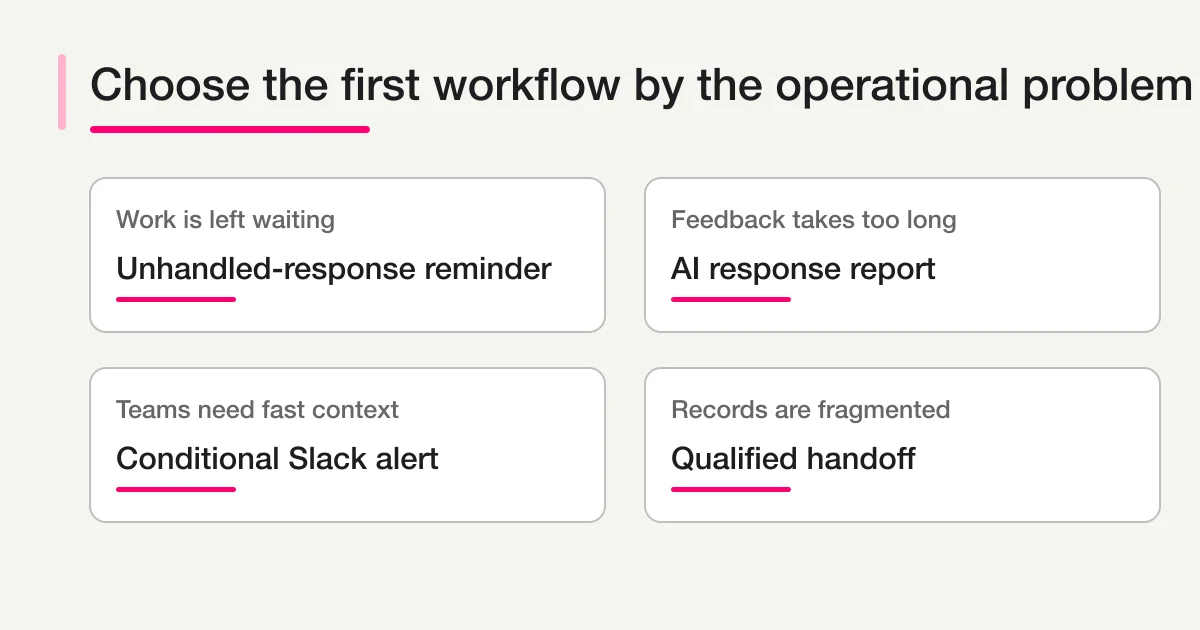
| Operational problem | Small first workflow | AI responsibility | Human responsibility |
|---|---|---|---|
| Responses are left unattended | Unhandled-response reminder | Explain why an item may need attention | Assign and resolve |
| Feedback takes too long to read | AI response report | Group themes and summarize evidence | Choose the improvement action |
| Teams need fast visibility | Conditional Slack alert | Produce a concise context block | Own and update the case |
| Records are fragmented | Qualified handoff | Propose normalized fields and destination | Approve sensitive or ambiguous transfers |
FORMLOVA includes an AI Response Report workflow, a Slack and Sheets logging workflow, and an unhandled-response follow-up workflow. Choose one operational problem, not three platforms at once.
Measure reliability as an operating system
Model accuracy is only one metric. A workflow can classify well and still fail operationally because notifications are ignored or ownership is unclear.
Track four groups of signals:
- Coverage: What share of eligible responses entered the workflow?
- Quality: How often did reviewers change the category, summary, or proposed owner?
- Operations: Did unhandled volume, first-response time, or backlog age improve?
- Safety: How many cases reached review, failed validation, retried, or were stopped?
Review changes are especially valuable. They are not merely corrections. They show where labels overlap, instructions are unclear, or the input form lacks a field.
Keep a small evaluation set of real, redacted examples. Re-run it when prompts, models, categories, or routing rules change. Do not rely only on a successful demo case.
Common AI workflow mistakes
Sending every output to Slack
This creates a stream, not a workflow. Notifications should express exceptions, ownership, and action. Keep the complete record somewhere durable.
Letting AI set the final business state
Suggested state is useful. Silent deletion, rejection, exclusion, or completion is risky. Require explicit rules or approval for consequential transitions.
Hiding the source evidence
A summary without the original response makes review slow and encourages over-trust. Preserve the source and explain why a label was proposed.
Copying data into every tool
More destinations create more failure modes. Decide which system owns the source, which receives a working copy, and how duplicates are handled.
Measuring generated text instead of business movement
The number of summaries created is not the result. Measure whether the right person acted sooner and whether fewer responses were lost.
A practical implementation sequence
Use this order for a first production workflow:
- Write the business decision in one sentence.
- Define eligible inputs and exclusions.
- Separate structured facts from text that needs interpretation.
- Specify a small output schema.
- Define review and stop conditions.
- Store the original, suggestion, decision, owner, and state.
- Add one downstream action.
- Test with historical examples and deliberate edge cases.
- Run in suggestion-only mode.
- Measure reviewer changes and operational results before expanding autonomy.
This sequence may feel slower than connecting several tools in a demo. It is faster than repairing a workflow whose state and authority were never defined.
How FORMLOVA fits
FORMLOVA provides a structured response as the trigger and keeps form operations accessible through chat and MCP. You can search responses, inspect status, prepare reports, configure workflows, and connect post-submit actions while retaining a durable form-side record.
That does not mean every operation should run without review. The useful advantage is that the AI client can work with explicit tools and current state rather than inventing an action from prose alone.
To explore the response side before building automation, read how to chat with form responses. To design broader automation around confirmation, routing, status, Sheets, and reporting, return to the form automation guide.
Final takeaway
An AI workflow is a controlled bridge between ambiguous information and operational action.
The best first workflow does not maximize autonomy. It makes one recurring judgment faster, records its evidence, routes uncertainty to a person, and improves a result the team already cares about.
Start with input, judgment, state, and action. Give AI the interpretation task. Give the system the durable record. Give people authority over consequential execution.
You can start with FORMLOVA, review the MCP setup guide, or inspect the MCP demo before connecting an AI client.
Disclosure and Verification
- This is a FORMLOVA first-party article written from the product's operating model and current repository specification.
- I reviewed the Model Context Protocol documentation for the current description of MCP as a way for AI applications to connect to external systems.
- I reviewed OpenAI's MCP documentation and the n8n AI workflow tutorial for current market terminology. These sources do not validate FORMLOVA product claims.
- AI outputs can be incorrect. Workflows involving personal data, contracts, employment, health, finance, security, refunds, or other high-impact decisions should retain appropriate human review and follow the organization's policies.