
Last updated: October 15, 2026
Original verification record (retained; this rewrite does not re-certify every historical statement): Last verified: September 4, 2026
An email form sends web input to a server for validation and, depending on the system, storage and email. It differs from a mailto link, which opens the visitor’s mail composer. For operational intake, keep a stored response as the record and use email to alert someone to review it.
Check the record, owner notification and respondent acknowledgement separately. Form success, provider acceptance and inbox delivery are different states.
Short answer: an email form processes web input on a server
Separate these three patterns first.
| Pattern | What happens | Best fit |
|---|---|---|
| Email form | The browser submits to a server, which may validate, send email, store data, or combine those actions | Contact, registration, request, application, and survey flows |
mailto: link | A local or web email composer opens | Low-volume contact where the sender should use their own mailbox |
| Displayed email address | The visitor copies the address and writes a message | A fallback contact route |
The HTML <form> element represents a document section with interactive controls for submitting information. By contrast, mailto: is a URI scheme for resources reached through internet mail; MDN describes it as a link that opens a new outgoing email message.
An email form can standardize fields, validate required input, and create an operational record. A mailto: link depends on the visitor having a suitable email handler, but it can leave a useful sent-message record in the visitor's own mailbox. Neither option is universally superior.
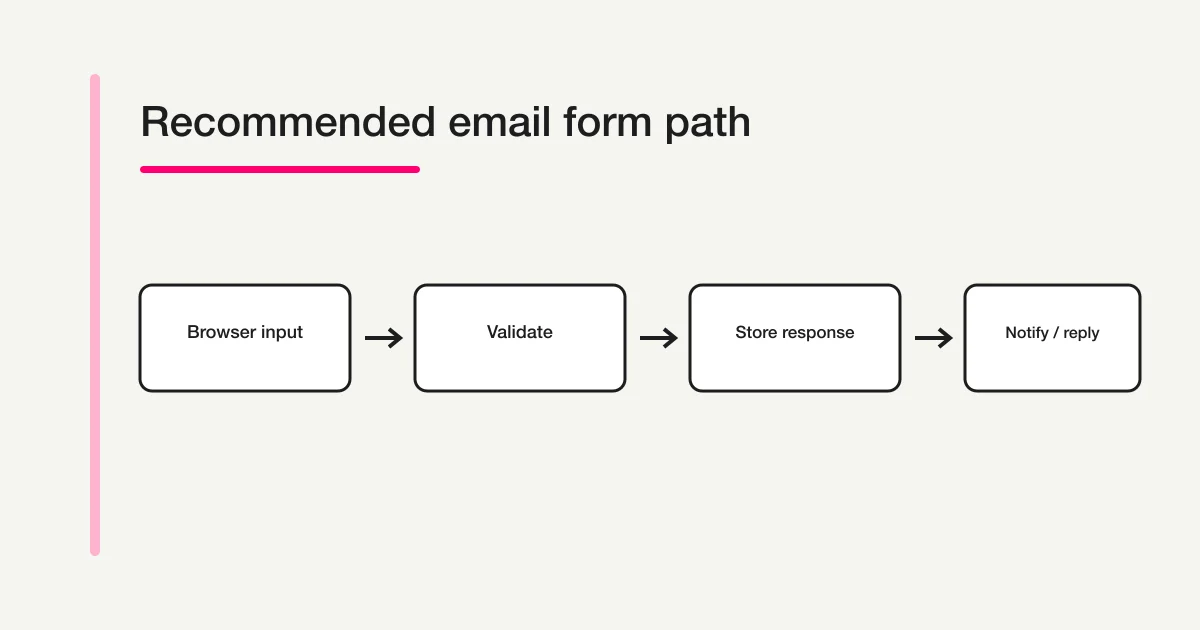
How an email form works
What email forms share is the browser-to-server submission. Some implementations send an email without durable storage. The rest of this section describes a recommended resilient path: “Browser → server validation → response storage → notification.”
1. The respondent enters information
The page may collect a name, email address, category, and message. A confirmation step can help, but it does not eliminate mistakes. Check required fields, length, allowed choices, and format both in the interface and on the server.
2. The server validates the request
Client-side validation improves usability, but a requester can alter the payload. OWASP recommends validating input as early as possible and performing validation on the server, not only in browser code.
If a route uses authenticated cookies or shares infrastructure with account actions, CSRF belongs in the threat model. OWASP says SameSite is generally defense in depth rather than a universal substitute for a proper CSRF control. Framework protection, tokens, and origin-related checks may be appropriate depending on the application.
3. A resilient design stores the response
Some implementations send mail without persisting the submission. For resilient intake operations, store a validated response to create a durable record. A notification might be delayed, rejected, or sorted into spam. A stored response that remains visible in an authenticated management surface is less likely to disappear with an email problem.
The implementation should also avoid showing success after storage failure and should define what happens when a submission is retried.
4. The system notifies an owner and may acknowledge the respondent
Notification and auto-reply are different.
- Notification: tells the form owner or assigned staff that a response exists
- Auto-reply: tells the respondent that the submission was received and what happens next
The sender address and Reply-To are separate decisions. Use a From address authorized for the sending domain and set Reply-To to a monitored address when replies should reach a team. Do not impersonate the respondent's entered address as the sending identity.
Submission success and inbox delivery are different
Submission success and inbox delivery are different. An email API accepting a request, a receiving mail server accepting a message, and a person seeing that message are also distinct states.
Resend's official event definitions say email.sent means the API request succeeded and Resend will attempt delivery, while email.delivered means the recipient's mail server accepted the message. Delayed, failed, bounced, and suppressed states also exist. API success therefore does not prove that the intended person read the email.
For a detailed diagnostic pattern, see why a Google Forms auto-reply may not arrive. The product-specific steps differ, but the separation between recipient input, execution, provider, and receiving side remains useful.
Seven decisions to make before launch
1. Fields
Require only what is necessary to respond and process the request. The form creation guide routes different use cases to the right field and workflow guides.
2. Completion state
Tell the respondent whether intake succeeded, what happens next, the expected response time, and an alternative contact route. “Sent” alone does not set a useful expectation.
3. Source of truth
Choose whether the database, management screen, spreadsheet, or inbox is authoritative. A stored response should usually be authoritative; email can then be a prompt to review it.
4. Notification and auto-reply
Decide who gets notified, when notifications are sent, whether the respondent receives an acknowledgement, and where replies go. Do not promise a response time that the team cannot meet.
5. Spam and bot controls
Consider rate limiting, bot verification, honeypots, and duplicate controls. No single layer provides complete protection. The contact form CAPTCHA comparison owns the product-selection detail.
6. Personal-data handling
For Japan, the Personal Information Protection Commission's official guidance addresses specifying the purpose of use, implementing safeguards, and setting retention according to necessity. Other jurisdictions may add different obligations.
State the purpose of use and contact route on the form, then define access, retention period, and deletion procedures for operators. The contact-form privacy wording guide covers the copy-level decisions. This is general implementation information, not legal advice.
7. Failure checks
Submit one test response and verify response storage, owner notification, auto-reply, and reply routing separately. Define who checks the stored-response list if a notification does not arrive.
Keep sensitive responses out of notification bodies
Putting every answer in a notification email is convenient, but forwarding, misdelivery, shared devices, and lock-screen previews can enlarge the exposure surface. Do not place sensitive response content in notification email bodies. Prefer a minimal “new response” notice and a link to an access-controlled response view.
If a preview is operationally necessary, choose fields individually. Avoid putting passwords, payment data, health details, identity documents, or other sensitive content into email. First reconsider whether a general-purpose form should collect the information at all.
When an email form fits—and when it does not
| Situation | Direction |
|---|---|
| You need consistent required fields and categories | An email form fits |
| Several people manage requests | Choose storage, search, status, and permissions—not email alone |
| You must show a purpose-of-use notice on the page | An email form fits |
| You receive only a few messages and value the sender's email history | A mailto: link may be enough |
| Attachments and free-form correspondence dominate | A direct mailbox may fit better |
| You collect highly sensitive or identity-verification data | Evaluate a specialized system with legal and security review |
Ask not only whether the page can be built, but who can see responses, where they are stored, how quickly the team responds, and how access is removed after role changes.
How FORMLOVA handles the intake boundary
For FORMLOVA's regular non-payment forms, the server validates against server-side field definitions, stores the response in Supabase, and then runs the owner-notification or respondent-auto-reply work enabled by the plan asynchronously with after(). For paid forms, it first stores a pending response, sends the respondent through Checkout, and processes email side effects in paid-response-effects only after payment completion is confirmed. In both paths, a mail-processing error does not retroactively turn a stored response into an unreceived response.
As of September 4, 2026, every plan includes form creation and publication, unlimited response intake, response search and status management, and CSV/Excel export. Free uses a six-hour digest for response notifications; Standard and Premium use real-time notifications. Custom respondent auto-replies and email branding are available on Standard and Premium.
The public submission path includes server validation, a rate-limit check, and a Turnstile verification path. Whether missing or invalid tokens are rejected depends on the deployed protection mode. This is not a claim that FORMLOVA completely blocks every bot or sales submission.
Paid real-time notifications can use per-form recipients. Free sends a six-hour owner digest across owned forms and ignores the per-form address list. Response notifications are outside sending quota; custom auto replies consume quota. Stored responses remain searchable from the dashboard or chat. This makes email a notification layer rather than the only history. If you need only a lightweight link to the visitor's mail app—or a specialized high-security intake system—compare those alternatives fairly.
These statements were checked on September 4, 2026 against app/form-render/[slug]/actions.ts, app/api/webhooks/stripe/route.ts, lib/resend/actions.ts, lib/stripe/paid-response-effects.ts, lib/resend/branding.ts, lib/mcp/tools/responses.ts, lib/mcp/tools/response-management.ts, and the plan source of truth at lib/plans/definition.ts.
Draft a small contact intake and separate the three checks
This is a proposed trial, not an operation or result measured for this rewrite. Use a private test draft first.
Create a private product-inquiry draft with topic, message and contact email. State that a human reviews requests and leave the response-time promise for me to confirm. Do not enable custom auto reply or publish. Show which checks verify storage, owner digest and any future paid reply separately.
Before proceeding, check:
- Preview required empty and malformed email inputs; inspect actual errors and entered-value retention.
- Publish only under controlled conditions for a storage test, then check the stored row independently of mail.
- Check the Free digest in its scheduled window. A custom reply needs Standard or above, configuration and a separate test with an address you control.
Inspect the stored-contact workflow on Free
Free covers the form, stored responses, search, export and owner digest. It does not include custom respondent auto reply or form-specific recipient routing.
Register free and draft the contact intake
Register, verify your email, connect a supported AI client, and paste the proposed request above. Check the saved draft before publishing. AI-client account and usage requirements apply separately.
Official sources
- MDN: HTML form element
- MDN: Creating links—Email links
- IETF RFC 6068: The mailto URI Scheme
- OWASP: Input Validation Cheat Sheet
- OWASP: Cross-Site Request Forgery Prevention Cheat Sheet
- Japan Personal Information Protection Commission: General Guidelines
- Japan Personal Information Protection Commission: Guidelines Q&A
- Resend: Email event types
The sources were checked on September 4, 2026. Product controls, pricing, deployment policy, and regulatory guidance can change, so confirm the current official information at implementation time.
Pre-launch checklist
- Required fields are limited to processing needs
- The server validates input, not only the browser
- The system shows completion only after durable intake succeeds
- Notification and auto-reply are separate
- From and Reply-To are deliberate and Reply-To is monitored
- Submission success and inbox delivery can be checked separately
- Rate limiting, bot controls, and CSRF scope were reviewed
- Sensitive response content is not placed in notification bodies
- Purpose of use, access, retention period, and deletion are defined
- One real test submission was completed before launch
This article's next review date is October 16, 2026. After publication, monitor “what is an email form,” “email form vs mailto,” “how email forms work,” and “email form security” by locale in Search Console. The Japanese seed keyword's monthly volume of 1,000, SEO difficulty 47, CPC of USD 6.35, and latest-month change of -22.1% versus the 12-month average come from Rakko Keyword's 24-month dataset checked on September 4, 2026. These figures do not guarantee rankings or traffic.
What to do next
Choose the durable record and the person who checks it when mail is delayed. Add acknowledgements or staff routing only after the required plan and a controlled round-trip test are confirmed.
Related Guides and References
Disclosure and Verification
The author develops FORMLOVA. Web standards, security guidance, privacy principles, and email event states were checked against the official sources above, while FORMLOVA statements were checked against the current code and plan source of truth on September 4, 2026. This guide does not guarantee complete security, inbox delivery, or legal compliance.
To test an email form that keeps a stored, searchable response record instead of relying on email alone, start FORMLOVA for free, create one form, and review previews, then verify a test response and notification path under controlled publication.