
Last updated: August 13, 2026
AI adoption is not the same as AI process improvement.
An organization can buy AI tools, run workshops, and produce many summaries without changing how work moves. People may save a few minutes individually while the team still loses inquiries, waits for ownership, copies data between systems, and prepares the same weekly report by hand.
Process improvement begins with the operation, not the model.
AI process improvement means changing a measurable flow of work so that people spend less time reading and reformatting, exceptions become visible earlier, and consequential decisions remain accountable.
The most useful first project is rarely “build an AI transformation platform.” It is usually a small repeated loop: read incoming responses, propose a category, assign ownership, draft the next step, return unattended items, and review outcomes.
This guide explains how to choose that loop and make it stick. For the technical operating model inside a single workflow, read what an AI workflow is. For the wider map of post-submit rules, notifications, status, and integrations, use the form automation guide.
The short answer: improve five layers
| Layer | Question | Typical evidence |
|---|---|---|
| Intake | Is the required context captured once? | Missing-field rate, rework |
| Interpretation | What repeated reading can AI assist? | Review time, correction rate |
| Ownership | Does every item have a responsible person? | Unassigned count, queue age |
| Action | Is the next step clear and controlled? | First-response time, completion rate |
| Learning | Does the team see patterns and improve the process? | Weekly themes, recurring failure reasons |
Improving only interpretation creates impressive text but weak operations. A summary does not assign an owner. A category does not send a safe response. A dashboard does not resolve an overdue case.
The process must connect all five layers.
Choose a process, not a department
“Use AI in customer support” is too broad. Choose a flow with a trigger and an end state.
Examples:
- Pricing inquiry received -> qualified owner accepts it.
- Event feedback received -> themes reviewed and an improvement action is assigned.
- Job application received -> required information checked and recruiter review begins.
- Low customer score received -> follow-up decision is recorded.
- Internal request received -> category, owner, and due date are confirmed.
A good first process has:
- Repeated volume.
- A visible manual bottleneck.
- A bounded input.
- A reviewable output.
- Low-cost recovery from mistakes.
- A result that can be measured within weeks.
Avoid beginning with rare, high-impact, or politically ambiguous decisions. If the organization has not agreed who owns a process, AI will not repair that ambiguity.
Map the current process before proposing AI
Write down what happens today, including the informal steps.
1. Form response arrives.
2. Shared inbox notification is sent.
3. Operations opens the response.
4. Operations asks in chat who should own it.
5. Someone copies details to a spreadsheet.
6. A reply is drafted from an old template.
7. Status is updated only if someone remembers.
8. Weekly totals are assembled manually.
For each step, record:
- Actor.
- Input.
- Decision.
- System used.
- Waiting time.
- Common error.
- State created.
- Evidence of completion.
The largest delay may not be the reading itself. It may be waiting for ownership or reconciling several copies. AI should address the actual constraint.
Distinguish rules, AI, and human authority
Use three columns when redesigning the process.
| Work type | Best mechanism | Example |
|---|---|---|
| Explicit fact or threshold | Deterministic rule | Score is below 3 |
| Ambiguous language interpretation | AI suggestion | Theme is onboarding confusion |
| Consequential judgment | Human decision | Promise a refund or reject an application |
This prevents two opposite mistakes.
The first is adding AI to a task that needs a simple rule. The second is giving a model authority because it writes confidently.
AI is particularly useful between intake and decision: summarization, classification, evidence extraction, draft generation, and anomaly surfacing. Keep the original input visible and define when the result requires review.
Form responses are a practical starting point
Form submissions have a useful combination of structure and ambiguity.
Fields such as date, score, selected category, budget range, and consent are explicit. Free-text messages, motivations, complaints, and suggestions require interpretation. This makes it possible to use rules for facts and AI for language without asking the model to reconstruct the entire context.
A well-designed intake might capture:
request_type
organization
desired_outcome
deadline
contact_permission
free_text_context
attachment
The AI step can then return:
summary
category_suggestion
priority_suggestion
owner_candidate
missing_information
evidence
needs_review
FORMLOVA keeps the response as the operational starting point and connects it to status, search, notifications, reports, and workflows. For the analysis layer, read form analysis explained.
Define the target state before the pilot
Do not define success as “the AI feature is live.” Define what changes in the process.
Example target:
Within four weeks:
- every eligible inquiry has a category and owner state,
- high-priority items enter review within one business hour,
- weekly reporting takes less than 30 minutes,
- no external reply is sent without human approval,
- reviewer corrections are recorded for learning.
Use a baseline from the current process. Measure at least one speed metric, one quality metric, one adoption metric, and one safety metric.
| Metric group | Examples |
|---|---|
| Speed | First review time, first response time, report preparation time |
| Quality | Category correction rate, reopened cases, missing information |
| Adoption | Eligible items processed, reviewer participation, override completion |
| Safety | Unreviewed high-impact actions, privacy incidents, failed deliveries |
If the baseline is unavailable, run a short observation period before enabling automation.
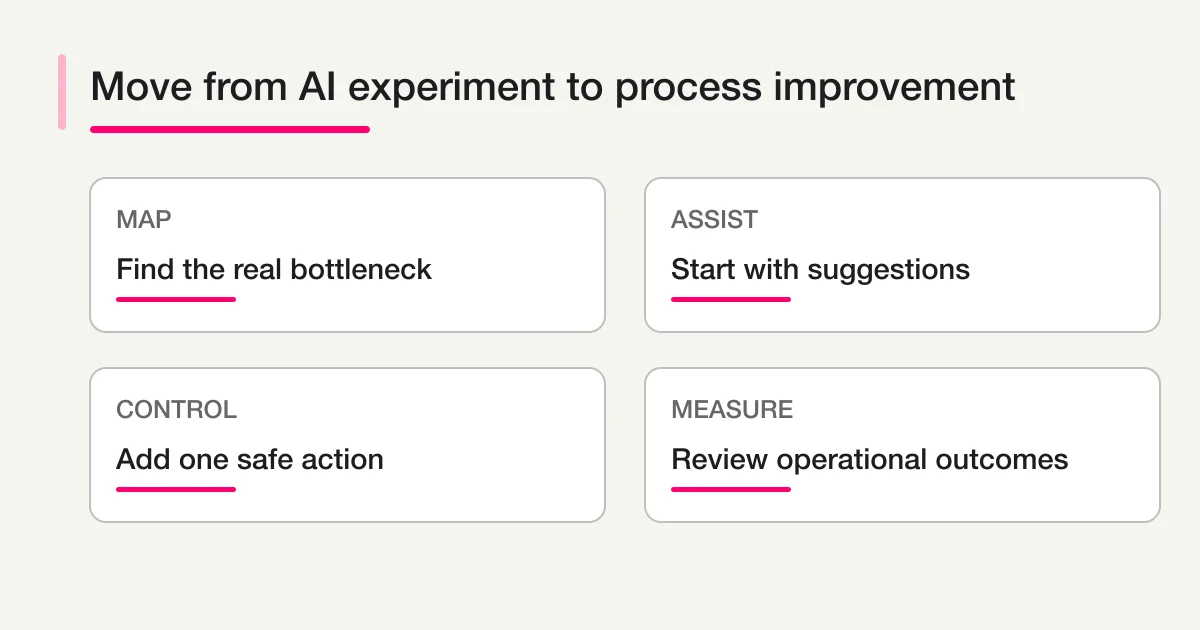
Start in suggestion-only mode
The first production phase should usually display AI output without changing external systems automatically.
Reviewers compare:
- Source response.
- AI summary.
- Category and owner suggestion.
- Evidence.
- Their final decision.
Capture the difference. A correction without a reason is less useful than a correction with a label such as missing context, overlapping categories, policy exception, or model error.
Suggestion-only mode reveals whether the workflow definition is usable. It also lets the team practice the new process before authority expands.
Add one controlled action
After suggestions are reliable enough, add one downstream action.
Good early actions include:
- Notify the proposed team after rule validation.
- Add an eligible record to a review Sheet.
- Create a draft reply.
- Add an internal tag.
- Include the item in a daily digest.
Avoid combining classification, CRM creation, customer email, task assignment, and reporting in the first release. When a complex pipeline fails, the team cannot tell whether the problem is the model, mapping, permissions, or policy.
The form response handoff guide covers the contract for Sheets, CRM, and Notion.
Make exceptions part of normal operations
Every AI-supported workflow needs a place for cases that do not fit.
Common exception reasons:
- Required information is missing.
- The text contains conflicting requests.
- The category is sensitive.
- Confidence is low.
- A person or company match is ambiguous.
- Consent does not cover the intended action.
- A downstream integration failed.
- The response appears duplicated or malicious.
Create a visible needs_review state. Assign an owner and expected review time. Do not leave exceptions in a model log or an integration error console that operational users never see.
Adoption depends on the review experience
A workflow can be technically correct and still fail because reviewing it is slower than doing the old task.
Reviewers need:
- The original input next to the AI output.
- A clear reason for the suggestion.
- A small set of meaningful correction choices.
- One place to confirm owner and status.
- A direct way to stop or escalate.
- Feedback that their correction was recorded.
Avoid making people copy model output from one tool into another. If the workflow adds a review step, remove an equivalent manual step elsewhere.
Train people on the decision boundary, not on prompt tricks. They should know what AI may suggest, what it may never execute, and how to report a harmful or confusing result.
Use a weekly operating review
The first weeks need a short recurring review with operational owners.
Discuss:
- Volume entering the workflow.
- Items that bypassed it.
- Correction and escalation reasons.
- Oldest unresolved cases.
- Delivery failures.
- Changes in response time or backlog.
- One process or input change for the next week.
An inquiry weekly status report can help keep the same review frame. An AI response report is useful when the primary goal is extracting themes from many responses.
Do not change prompts, categories, routing, and the underlying form at the same time. Small controlled changes make improvement attributable.
Connect AI output to operational visibility
AI output should become a filterable field or linked evidence, not a detached document.
A practical dashboard might show:
- New responses.
- Unassigned responses.
- High-priority suggestions awaiting confirmation.
- Overdue items by owner.
- Delivery failures.
- Category distribution.
- Reviewer correction rate.
- Recurring themes with source examples.
The form response dashboard guide explains how to organize response, owner, status, and reporting views.
Visibility changes behavior. If the team cannot see where the process stops, it cannot improve the process.
Governance should scale with consequence
Use stronger controls as the consequence increases.
Low-risk internal summary may need logging and periodic sampling. A customer-facing reply needs source verification and approval. A decision affecting employment, access, payment, or legal rights needs specialized policy and human authority.
NIST's AI Risk Management Framework uses governance, mapping, measurement, and management as core functions. You do not need a large compliance program for a small pilot, but you do need named ownership, known context, measured behavior, and a response plan.
Document:
- Process owner.
- Data included and excluded.
- Model or service dependencies.
- Approved actions.
- Human review points.
- Evaluation examples.
- Incident and rollback path.
- Retention and access rules.
- Change history.
A 30-day adoption sequence
Week 1: observe and map
Collect baseline volume, waiting time, rework, and failure reasons. Select one process and one owner.
Week 2: run suggestion-only
Generate summaries and categories. Record corrections. Refine the schema and review rules.
Week 3: add one action
Enable a conditional notification, draft, or internal record. Keep consequential execution under approval.
Week 4: review outcomes
Compare baseline and pilot. Decide whether to keep, narrow, improve, or expand. Document known failure modes before granting more authority.
This sequence is deliberately small. Its purpose is to create operational evidence, not a transformation presentation.
Common failure modes
Buying tools before naming the process
Usage spreads unevenly and no shared result appears. Select a flow and owner first.
Automating every item
Noise and edge cases expand. Define eligibility and exception routes.
Starting with automatic replies
The highest-consequence action is automated before the input and review process are reliable. Begin with reading, classification, and drafting.
Ignoring the destination contract
CRM, Sheets, and Notion fill with inconsistent data. Define destination purpose and field mapping.
Measuring content production
More summaries do not prove better operations. Measure backlog, time, ownership, and corrections.
Treating human review as free
Review takes time. Design the interface and measure the effort. Remove redundant manual work.
How FORMLOVA fits
FORMLOVA is useful when the process begins with a form response and continues through analysis, ownership, status, notifications, handoffs, and reports.
For inquiry-specific design, continue to AI inquiry response automation. To understand cross-form analysis before automation, read how to chat with form responses.
You can begin with one real workflow rather than a broad platform rollout. Start with FORMLOVA, review the MCP setup guide, or inspect the MCP demo.
Final takeaway
AI process improvement is a change to how work moves.
Choose a repeated process with a measurable problem. Map its current state. Use rules for explicit facts, AI for bounded interpretation, and people for consequential judgment. Begin with suggestions, add one controlled action, return exceptions to a visible queue, and review outcomes every week.
The result is not “AI everywhere.” It is a smaller, clearer operating loop in which fewer items are lost and people spend their attention where it matters.
Disclosure and Verification
- This is a FORMLOVA first-party process design guide based on the current product operating model.
- I reviewed NIST's official AI Risk Management Framework for current governance, mapping, measurement, and management vocabulary.
- I reviewed the OECD's official AI Principles for current human-centered, transparency, robustness, and accountability principles.
- This article is not legal, employment, medical, financial, or compliance advice. Apply domain-specific policy and qualified review to high-impact processes.