
Last updated: August 31, 2026 Last verified: August 31, 2026
A paper survey is more than a list of questions on an A4 page. People need enough room to mark choices and write comments, while the team needs a reliable way to identify, store, and review each response later.
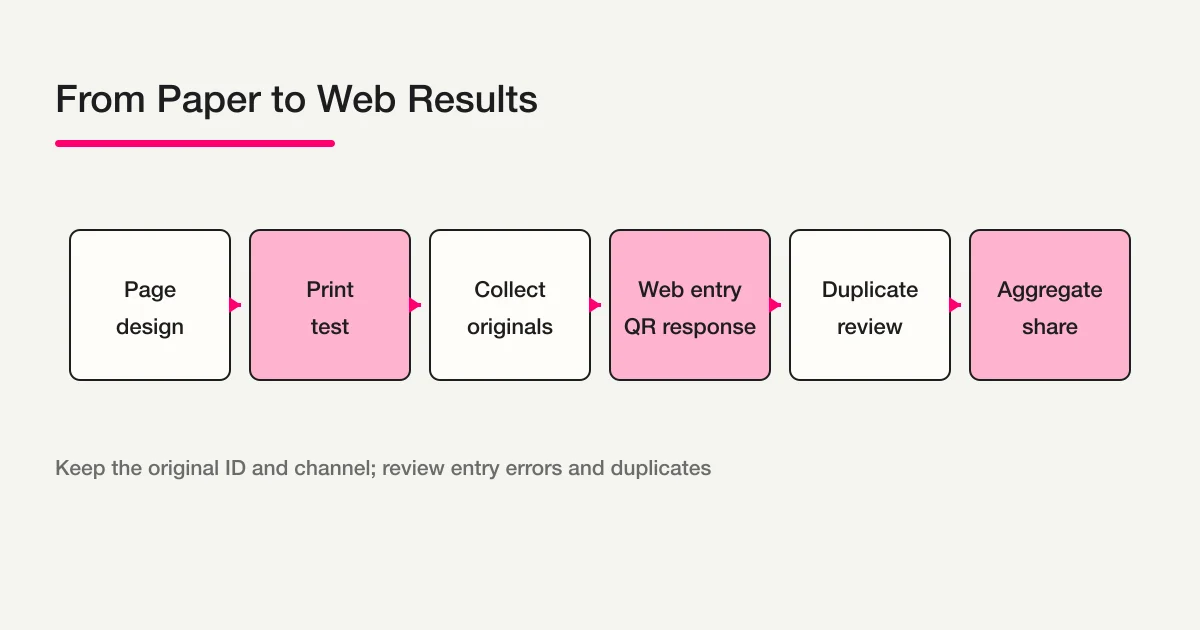
You can keep the survey on paper, combine paper with a web form, or move most responses online while retaining a printed option. This guide follows the work from page layout to print testing, collection, web entry, QR distribution, duplicate review, and aggregation. FORMLOVA’s MCP generate_qr_code can create a respondent-URL PNG for a published FORMLOVA form, but it does not read paper or synchronize a paper response. For other destinations, choose and verify the QR method that fits the service.
Decide whether paper, web, or both is the right channel
Write one sentence about the decision the answers will support. Then choose the channel before you design the page.
| Approach | Good fit | Decide first |
|---|---|---|
| Paper only | People answer at a venue or counter | Collection box, original storage, and aggregation owner |
| Paper plus web | You want a printed option and a remote or mobile option | Channel field, original ID, and duplicate policy |
| Web first | You want to reduce printing and manual entry | Public URL, respondent instructions, and retention policy |
For the general methodology behind goals, question formats, and non-leading wording, use the survey design guide. This page stays focused on the physical page and the handoff between channels.
Step 1: Plan the A4 page structure
Readers should understand what to do before they reach the first question. A useful top-to-bottom order is:
- Title, estimated completion time, and deadline
- Purpose and how the response will be used
- Response instructions, such as “choose one” or “select all that apply”
- Numbered questions and their answer choices
- Checkboxes, rating marks, and open-text areas
- Optional contact details and the submission or web-response instruction
Use the same question numbers in the paper version and the web version. If the paper uses Q1 through Q6, keep that mapping when you build the web form. It prevents a transcription mistake from silently moving an answer to the wrong question.
If the survey has a second side, tell the respondent where to continue and how to submit it. Do not rely on a faint arrow at the bottom of the page. A short “continue on the back” instruction near the last visible question is easier to follow.
Step 2: Size checkboxes and open-text areas for real people
A checkbox should be easy to mark with a pen, and the label should make the choice clear without requiring the respondent to guess whether one or several choices are allowed. Put the instruction immediately before the options.
An open-text area needs both physical room and a prompt that tells people what kind of answer is useful. Lines alone do not tell a respondent whether a word, sentence, or example is expected.
Q1. How satisfied were you with today’s session? (Choose one)
[ ] Very satisfied  [ ] Satisfied  [ ] Neither  [ ] Dissatisfied

Q2. What led to your answer? (Optional)
________________________________________________
________________________________________________
If you need follow-up, ask for contact details only when there is a clear reason and explain how they will be used. An anonymous experience survey usually should not make a name mandatory. A support request may need a way to reply, but that does not mean every demographic field belongs on the page.
Keep one concept per question. “How satisfied were you with the price and the support?” produces an answer that cannot tell you which part needs improvement. For the underlying question design, keep the deeper discussion in the survey design guide rather than repeating it here.
Step 3: Print and test the actual copy
The layout file is not the final experience. Print at the real size on the paper and printer you will use, then write on it yourself. Check the following before producing a batch:
[ ] The title and purpose are readable before the first question.
[ ] Question numbers are complete and in order.
[ ] Each choice is visibly connected to its checkbox.
[ ] The open-text area is large enough for the expected answer.
[ ] The deadline, submission point, and reverse-side instruction are visible.
[ ] The page remains understandable in black and white.
Test on a table and, if relevant, while standing. A survey that looks elegant on a monitor can be awkward when a person holds it on a clipboard. Check whether the pen touches a neighboring choice, whether the paper folds over an instruction, and whether the collection point is obvious.
If you place a QR code on the page, test the printed copy with a separate phone. Confirm that the code opens the respondent URL, not an editor or preview URL. FORMLOVA’s MCP generate_qr_code can create a respondent-URL PNG for a published form, with a size from 100 to 1,000 pixels and an adjustable margin. It cannot be used for an unpublished form, and it is separate from OCR or synchronization of a paper response. An external QR method remains an option. The code itself does not publish a form or grant access. The destination’s publication and access settings still control the respondent experience.
Keep consent evidence aligned across paper and web
When you collect names, email addresses, phone numbers, health information, or other sensitive data, show the same version of the notice on both channels. Before the answer is collected, state the purpose, storage location, people who can access it, retention period, contact route for questions, and the route for withdrawal or deletion requests. Do not merge the channels while the paper notice and web notice describe different purposes or destinations.
Put a consent checkbox or signature area, the notice version, and the respondent’s written date on the paper copy. On the web side, keep evidence such as:
consent_status: accepted / declined / not_collected
consented_at: timestamp when consent was recorded
consent_version: version of the notice shown
For paper, record the presence or absence of the written consent, the notice version, and the collection timestamp in the ledger instead. Keep the wording version aligned across paper and web, and retain enough of the original ID and web response ID to route a question, withdrawal, or deletion request to the right record.
When you build the web form in FORMLOVA, add a legal field when the use case needs an explicit agreement and link to the relevant policy. A legal field is a regular form field, separate from the built-in require_privacy_consent consent gate; adding it alone does not satisfy the built-in consent requirement. Setting privacy_policy_url means privacy_policy_choice=required, but you must explicitly set require_privacy_consent=true to require the built-in consent gate at response time. Showing a URL does not remove the need to retain consent evidence. Compare the paper version and the web wording before publication, and keep their version identifiers in the records.
Step 4: Give every paper an audit trail
Before distribution, choose how a paper copy will be identified. You might print a serial number, assign a collection number at the venue, or record the event and date alongside the response. Choose a method that a person entering the response can follow later.
Keep a small collection ledger with fields such as:
| Field | Example |
|---|---|
| Original ID | P-20260831-0042 |
| Response channel | paper, QR, or web link |
| Collected at | 2026-08-31 15:20 JST |
| Transcribed by | Internal operator ID |
| Transcribed at | Time the entry was completed |
| Review state | Unchecked, checked, or needs review |
Set the retention period, audience, and disposal method for the originals before you collect personal data. If the sheet includes a name or contact detail, do not copy it into every analysis file. Keep only what the stated purpose requires and keep the source reference available to an authorized reviewer.
Step 5: Convert the page into a web form without losing meaning
Do not treat web conversion as simply uploading a scan. Map the question number, wording, choices, required or optional state, and open-text area from the paper version to the web version. If the web version changes a question, record that change so a later report does not pretend that the two channels are identical.
Add channel and transcription fields where your system supports them:
source_channel: paper / qr / web
original_id: paper original ID, or the web response ID
transcribed_by: operator ID for a paper entry
transcribed_at: timestamp for a paper entry
For a small batch, one person can enter and another can compare the entry with the original. For a larger batch, use a sampling rule or a two-person process that matches the risk and sensitivity of the data. Never guess at an unclear mark. Hold a blank, correction, multiple mark, or unreadable word for review.
FORMLOVA can be the web-form side of this process when you want a draft, a public responder URL, and a response-management surface. Start with a private draft, confirm the question order and respondent experience, then publish through the normal review process. Once web responses exist, use the available search, filtering, status, notes, and CSV/Excel export capabilities to establish a common aggregation entry point. The survey response aggregation and analysis guide covers that web-response work in more detail.
Keep a question-mapping sheet while you convert
The paper copy and the web form should have a small mapping record of their own. It can be as simple as this:
| Mapping field | Example |
|---|---|
| Question ID | Q3 |
| Paper wording | Which topics were useful? |
| Web field | useful_topics |
| Choice values | setup, examples, follow-up |
| Difference | Web adds an optional “other” field |
This record prevents a later analyst from combining values that only look similar. It also gives the transcription operator a clear answer when a paper checkbox is partly marked or when the web form has a new choice. Keep the mapping with the survey version and the date it became active.
If a printed batch is already in circulation, do not quietly replace its wording with the new web wording. Give the paper version a version label, keep its original question IDs, and report the difference. A web form may be easier to update, but the printed copy remains evidence of what a respondent was asked at that time.
For sensitive surveys, keep the mapping free of raw respondent data. It describes the questionnaire, not the people who answered it. Restrict the collection ledger and the original pages separately from the web-form editor and the aggregate report.
Step 6: Distribute a QR code and define the duplicate policy
A QR code should contain the public responder URL, not the editor’s address. Before printing or posting it:
- Open the destination in a separate device or a private browser window.
- Confirm the title, first question, publication state, and audience.
- Print at the intended size and scan the real paper with another phone.
- Decide what happens when someone answers on paper and through the QR link.
For Google Forms-specific link and QR actions, see the Google Forms QR code guide. A published FORMLOVA form can use MCP generate_qr_code for a respondent-URL PNG with a 100–1,000 pixel size and adjustable margin; unpublished forms are not eligible. For Formzu or Microsoft Forms, use the current respondent URL and access settings for that service. An external QR-generation method remains an option, and an image alone does not make the destination available.
When you accept both channels, a person can submit twice without intending to. If your policy allows an identifying field, use the minimum information needed to compare responses. If you deliberately collect anonymous responses, you may need to label a match as a duplicate candidate instead of automatically deleting it. Record who made the decision and why.
Reconcile the channels before you aggregate
Paper and web answers can be combined only when the values mean the same thing. Check the mapping before calculating a total:
| Check | Paper | Web |
|---|---|---|
| Question number | Q1 through Q6 | The same number or mapped field |
| No answer | Blank mark | Recorded as a missing value |
| Multiple choices | Each marked option | Each selected option |
| Open text | Transcribed within the rule | Response text reviewed |
| Channel | paper | qr or web |
Keep the counts for paper, QR, web, duplicate candidates, and unchecked entries in the report. A single satisfaction percentage without its channel and review status can hide a transcription problem.
Common failure modes
The page looks good but is hard to write on
Write on a real print before you approve the layout. Increase choice spacing, enlarge the open-text area, and make the reverse-side or collection instruction visible.
The paper and web versions drift apart
Maintain a question mapping with the same IDs, labels, and choice values. If the web version intentionally adds a question, mark it as a channel-specific field and keep it out of comparisons that require identical wording.
Transcription errors cannot be traced
Require an original ID, operator ID, entry timestamp, and review state. Keep an unclear mark as a review item instead of inventing a value.
A QR code scans but the form cannot be answered
Check that the image contains the responder URL, the form is published, and the intended audience has access. Repeat the test on the printed copy, not just in the design file.
FAQ
How many pages should a paper survey have?
Use the time and setting, not a universal page count. A standing respondent may need a short front-side-only version. If you use the back, make the continuation and submission instructions prominent and test the complete physical flow.
Can paper answers be turned into web data automatically?
Do not assume accurate automatic conversion. If you use a camera or OCR tool, a person should still verify marks, blanks, corrections, multiple choices, and personal information against the original. Keep the original ID and transcription history.
Does FORMLOVA create the QR image automatically?
For a published FORMLOVA form, MCP generate_qr_code can create a PNG for the respondent URL. You can set the image size from 100 to 1,000 pixels and adjust the margin. It does not accept an unpublished form, and it does not perform OCR or synchronize a paper response. Test the printed code and keep paper transcription and original retention as separate operations. An external QR method is also valid.
Can paper and web responses share one report?
Yes, when the question mapping, choice values, missing-value rule, and review state are aligned. Keep the channel and original ID so a reviewer can separate a genuine response from a duplicate candidate or transcription issue.
If you want to keep paper distribution while preparing a web form and response workflow, start FORMLOVA for free. After publication, MCP generate_qr_code can prepare the respondent-URL PNG, while consent evidence, paper transcription, and original retention still need their own operational checks.
Read next
- FORMLOVA Form Creation Guide: the use-case map for creating and operating forms.
- How to Design a Survey: goals, question formats, and non-leading wording.
- Survey Form Aggregation and Analysis: web-response review and free-text handling.
- How to Create a Formzu Survey: a Formzu-specific web implementation.
- How to Create a Microsoft Forms Survey: a Microsoft 365 web implementation.
References
Disclosure and Verification
This guide separates the physical work of designing, printing, collecting, and transcribing paper surveys from the web-form and QR steps. On August 31, 2026, I reviewed the existing article inventory, cluster registry, Search Console snapshots, and the July 17 Rakko reference values. FORMLOVA’s MCP generate_qr_code applies to published FORMLOVA forms; OCR, paper-response synchronization, other QR-generation methods, publication access, and cross-channel synchronization depend on the tools and operating rules you choose, so verify those details before collecting real responses.