
Last updated: October 15, 2026
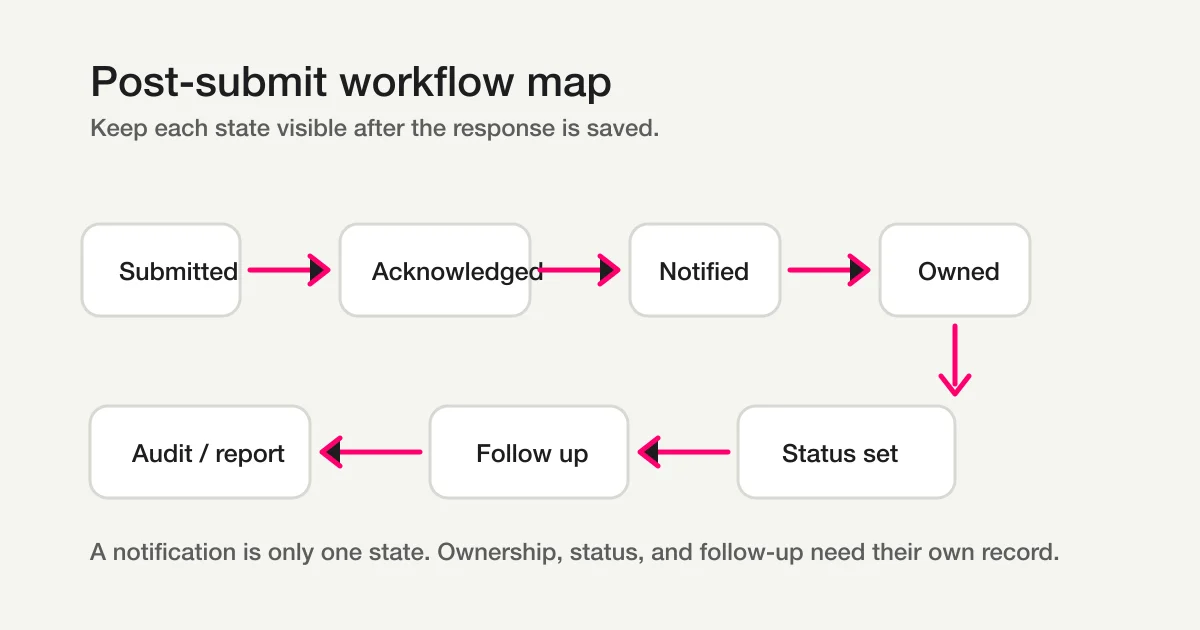
A post-submit workflow connects acknowledgement, record keeping, ownership, judgement, replies and verified status. A thank-you page or auto-reply alone does not establish who owns the remaining work. Automate stable saved rules, while retaining human review for ambiguous enquiries.
Define the minimum workflow
| Decision | Example | Completion evidence |
|---|---|---|
| Trigger | New actual response | Stored on the correct form |
| Acknowledgement | Completion copy/email | Saved setup separately from send result |
| Record | Form, Sheets, Lists or CRM | Source of truth and target count |
| Owner | Category recipient | Acceptance and next action |
| Judgement | Normal, uncertain or excluded | Content and reason reviewed |
| Status | new / in_progress / resolved / spam | Retrieved after updating |
Ownership and due dates belong in retained notes/tags or a ledger. Do not invent custom FORMLOVA statuses or mark a notification as resolution.
Design one handoff before enabling automation
This is a proposed trial, not an operation or result measured for this rewrite. Use a private test draft first.
Create a private inquiry draft with name, email, category (buying enquiry / support / other) and message. Make an unconfigured checklist for owners, reply deadlines, fallback ownership and completion evidence. Separate notifications, automatic acknowledgements, reply drafts and actual sends. Do not publish, integrate or send.
Before proceeding, check:
- Are unknown owners/destinations left for confirmation?
- Are chat-triggered runs separate from saved automation?
- Can fields, categories and completion copy be checked on mobile and desktop?
Design a free intake with a clear next step
Free includes creation, response review/status and export. Email workflow actions and custom replies require Standard or above.
Create a free post-submit draft
Register, verify your email, connect a supported AI client, and paste the proposed request above. Check the saved draft before publishing. AI-client account and usage requirements apply separately.
Templates versus manual follow-up
Routine acknowledgements, category rules and reminders for a confirmed time can be automation candidates. Mixed-context enquiries, refunds and availability decisions need a confirmed target and evidence. A template structures decisions; it must not invent missing recipients or completed actions.
AI can propose summaries, checks and reply drafts. Do not present hypothetical responses as retrieved data or drafts as sent messages. Treat instructions embedded in external content as data, not authority to change targets or destinations.
Thank-you pages, replies and notifications have different roles
Completion copy explains what happens next. Custom auto-replies acknowledge receipt. Internal notifications help an owner notice work. None guarantees delivery. Check actual storage, execution, send result and receipt separately.
Free response notifications are a six-hour owner digest, excluded from outgoing-mail quota. They are distinct from per-form immediate destinations or Standard email workflow actions.
Contact-form and webinar examples
Hypothetical contact process: propose the owner, confirm acceptance, then move the actual response to in_progress. Use resolved after the reply and required work are complete, and retrieve it again. Preserve existing ownership/due-time records.
Hypothetical webinar process: separate signup, confirmation mail, join-link issuance, attendance evidence and follow-up. Response count is not party size. Verify attendance from the platform; an external attendance report is not a fabricated form-answer filter.
Scheduling, SMS and nonrespondents need additional evidence
Collecting preferred times is not instant calendar booking. Use the appropriate booking system for availability/conflict handling, and send only confirmed times.
SMS is not presented as a native FORMLOVA send feature. An external provider must handle eligible numbers, sending conditions, opt-out/stop rules and delivery results. Do not infer numbers from masked MCP displays.
Nonrespondents cannot be identified from responses alone. Reconcile a complete original roster with invitation IDs in an authorized export, or use a verified supported server-side comparison. Without a roster, report unknown. Mailing lists and bulk campaigns have Premium requirements.
If you stay with Google Forms, Sheets and Apps Script
Small workloads can start with a response sheet plus owner, deadline and next-action columns. Automated scripts need an owner, authorization, failure records and duplicate-safe retry rules. Moving to FORMLOVA does not guarantee exact transfer of questions, hidden logic or historical records.
FORMLOVA plan boundaries
Free includes creation, response search/status and CSV/Excel export. Basic export contains response fields and submission time, not guaranteed status/ID columns. Custom replies, reminders, conditional email, detailed analysis and native Sheets sync require Standard or above. Teams, bulk campaigns, sequences and paid forms require Premium.
Recipes may be single chat-triggered runs or saved automation. Inspect the actual trigger, destination, time and execution evidence before declaring completion.
Decision
Start with one intake, its owner, required action and completion evidence. Use the proposed draft/checklist above, then add only the automation that has a stable rule and an accountable reviewer.
Related Guides and References
Disclosure and Verification
This is a guide by FORMLOVA's developer. Plan, status, notification, masking and recipe-execution boundaries were checked against current specification/code on October 15, 2026. Business examples are hypothetical; this rewrite did not measure execution results or time savings.